


The online bike taxi service in India is rising in popularity. Customers using the services of a bike taxi service report the following advantages:
- Faster transit routes
- Lower prices for individual travels
- Better accessibility advantages
Rapido is the market leader in this sector. It has a great UI, and the app delivers a user experience perspective.
Ridde is our attempt to clone the application using Flutter and Spring Boot. It provides commuters with the convenience of booking a bike taxi online anytime they want. Users can also book an immediate bike ride or schedule a ride for later in advance.
This is a walkthrough on how to create the clone app.
Prerequisites
To follow this tutorial, you must have a basic understanding of
- Flutter with Riverpod state management
- Web sockets
- Java Springboot ( JWT, JPA, H2 database, MVC Architecture) [Backend]
- Firebase (FCM Notifications)
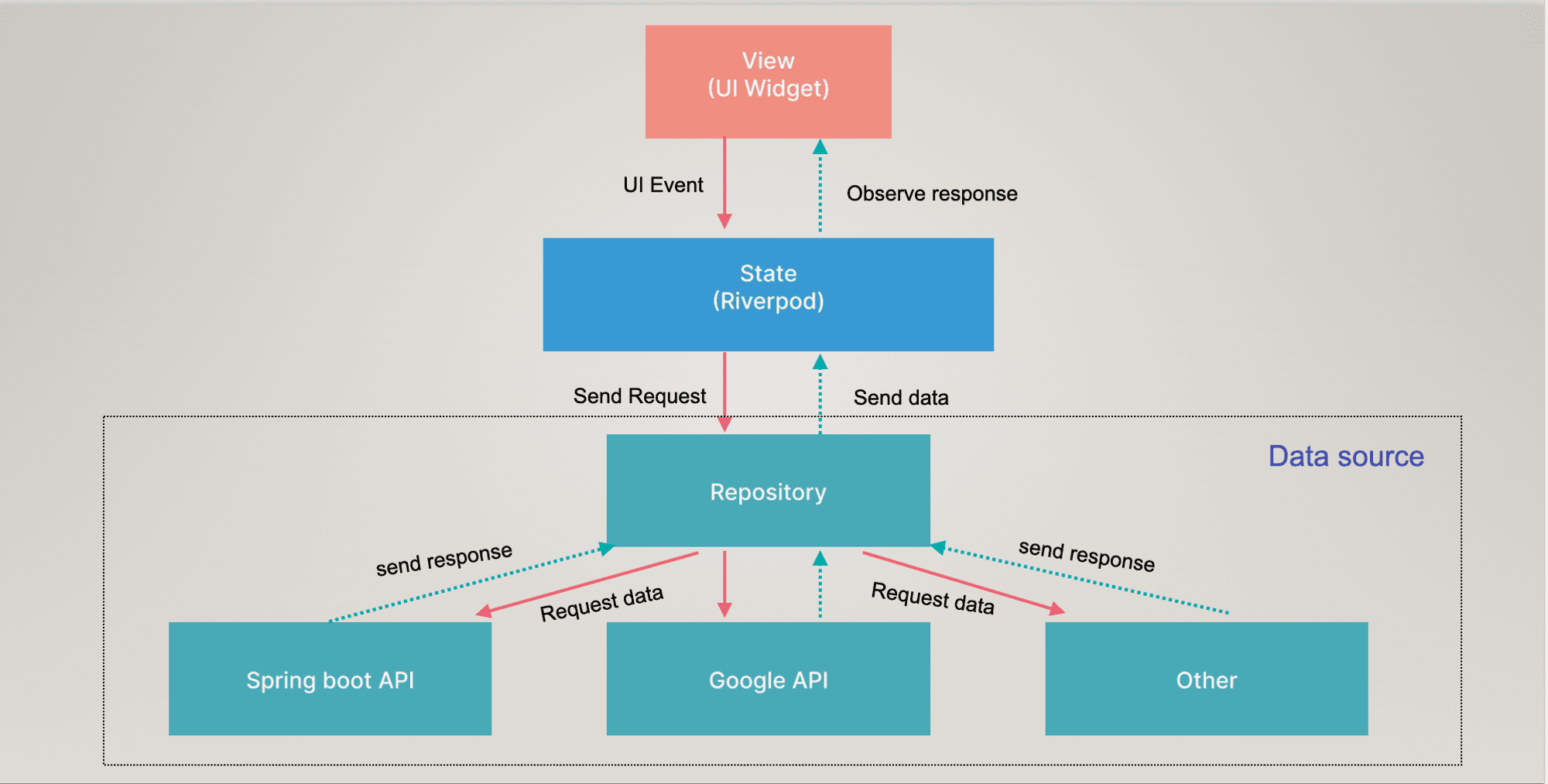
Flow Diagram
What are Web Sockets?
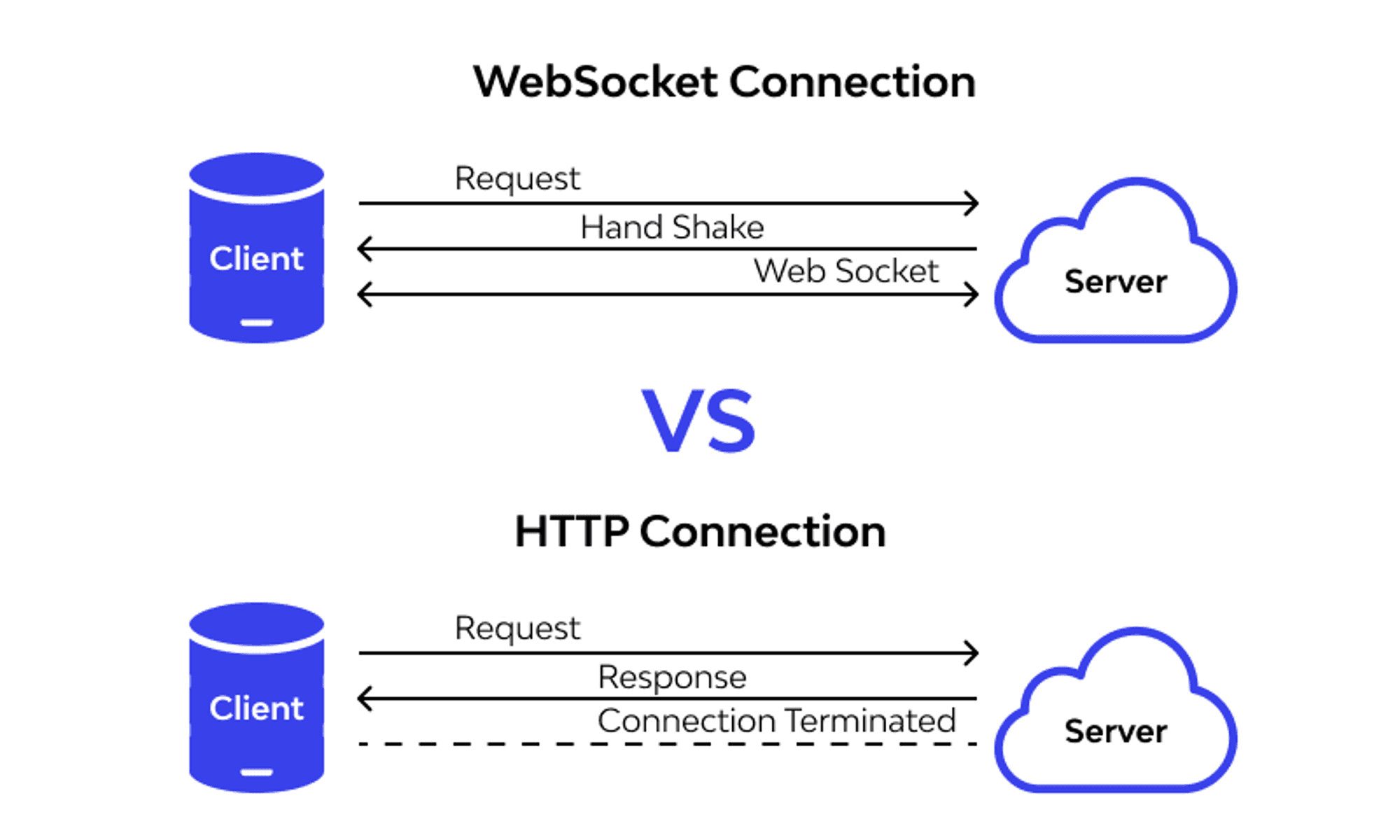
WebSocket is a protocol that allows two-way communication between server and client.
Why STOMP over Web Sockets?
- The WebSocket protocol is a low-level protocol. It defines how a stream of bytes is transformed into frames. A frame may contain a text or a binary message.
- The message lacks information on how to route or process it, making it difficult to implement more complex applications without writing additional code.
- The WebSocket specification allows the use of sub-protocols that operate on a higher application level. One of them, supported by the Spring Framework, is STOMP(simple text-based messaging protocol).
- STOMP, clients, and brokers developed in different languages can send and receive messages to and from each other. It defines a handful of frame types that are mapped onto WebSockets frames CONNECT, SUBSCRIBE, UNSUBSCRIBE, and SEND.
What is Spring Boot?
Spring is a Java framework built to create an enterprise-ready application. But multiple configurations are needed for it to function, so developers find it challenging to focus on their actual work. Spring Boot solves this issue.
Since Spring Boot is built on top of Spring, it offers all the features and benefits of Spring. It reduces code length and provides developers with the easiest way to build an application.
- The backend follows Model-View-Controller (MVC) structure and is based on monolithic architecture where all the project functionalities exist in a single codebase.
- The APIs developed in the backend are RESTful APIs.
- The database used is H2 Database which is an in-memory database.
- For securing our APIs from malicious users, we used spring security and JWT.
Packages Used in the Project
To get started, we need to add the following packages in our pubspec file:
  # state management tool
  flutter_riverpod: ^1.0.4
  # web socket package
  stomp_dart_client: ^0.4.4
  # network call using dio
  dio: ^4.0.6
  # display google map in flutter app
  google_maps_flutter: ^2.1.12
  # search place using google search place api
  google_place: ^0.4.7
  # draw poly line for direction api
  flutter_polyline_points: ^1.0.0
  # get current location and more
  geolocator: ^9.0.1
  # reverse or forward geocoding
  geocoding: ^2.0.5
  # get current live location
  location: ^4.4.0
  # firebase core to use firebase tool
  firebase_core: ^1.21.1
  # fcm notification
  firebase_messaging: ^13.0.0
  # google sign in
  google_sign_in: ^5.4.2
Setting up the Project
1. Frontend
Integrate the Stomp Client
We’ll need to add the Flutter package for the web socket for real-time communication in both projects. You can find it on pub.dev or run the following command in the terminal:
dart pub add stomp_dart_client
Setting up Stomp Client
Create a new folder states with a file stomp_client_state.dart in it for both the user and driver app.
Add the following code to build the socket connection:
- User App
# Socket Base url to build the web socket connection.
const kSocketBaseUrl = '$kBaseUrl/socket';
import 'dart:convert';
import 'dart:developer';
import 'package:easy_localization/easy_localization.dart';
import 'package:flutter/material.dart';
import 'package:flutter_riverpod/flutter_riverpod.dart';
import 'package:hive_flutter/hive_flutter.dart';
import 'package:logger/logger.dart';
import 'package:rapido_partner_clone/common/constant.dart';
import 'package:rapido_partner_clone/common/ui_helper.dart';
import 'package:rapido_partner_clone/config/env.dart';
import 'package:rapido_partner_clone/states/direction_state.dart';
import 'package:rapido_partner_clone/states/rider_state.dart';
import 'package:rapido_partner_clone/states/trip_state.dart';
import 'package:stomp_dart_client/stomp.dart';
import 'package:stomp_dart_client/stomp_config.dart';
import 'package:stomp_dart_client/stomp_frame.dart';
import '../data/model/trip.dart';
final stompClientProvider =
Provider.family<StompClient, BuildContext>((ref, context) {
String token = Hive.box('prefs').get('token', defaultValue: '');
final logger = Logger();
late final StompClient client;
String state = '';
try {
client = StompClient(
config: StompConfig.SockJS(
url: kSocketBaseUrl,
stompConnectHeaders: {
// 'Connection': 'Upgrade',
// 'Upgrade': 'websocket',
'Authorization': 'Bearer $token',
},
webSocketConnectHeaders: {
'Authorization': 'Bearer $token',
},
onStompError: (StompFrame frame) {
logger.i(
'A stomp error occurred in web socket connection :: ${frame.body}');
},
onWebSocketError: (dynamic frame) {
logger.i(
'A Web socket error occurred in web socket connection :: ${frame.toString()}');
},
onDebugMessage: (p0) {
logger.i('onDebugMessage');
},
onWebSocketDone: () {
logger.i('onDebugMessage');
},
onConnect: (data) {
logger.i('connected to socket');
var response = json.decode(data.body!);
var trip = Trip.fromJson(response["data"]);
String clientName = trip.username;
String? driverName = trip.driverUsername;
client.subscribe(
destination: "/topic/$clientName-$driverName/trippackage",
callback: (data) {
logger.d(data.body);
if (data.body != null) {
var response = json.decode(data.body!);
if (response['status'] != null &&
response["status"] == "success") {
var trip = Trip.fromJson(response["data"]);
log("User: TRIP_STATUS: ${trip.tripStatus}");
switch (trip.tripStatus) {
case kTripAccepted:
ref
.read(tripStatusProvider.notifier)
.updateTrip(trip: trip);
state = 'kTripAccepted';
break;
case kTripDriverToUserInProgress:
if (state != 'kTripDriverToUserInProgress') {
state = 'kTripDriverToUserInProgress';
ref
.read(tripStatusProvider.notifier)
.updateTrip(trip: trip);
}
ref
.read(driverStateProvider.notifier)
.updateDriverLocation(trip: trip);
break;
case kTripPickupToDropInProgress:
if (state != 'kTripPickupToDropInProgress') {
state = 'kTripPickupToDropInProgress';
ref
.read(tripStatusProvider.notifier)
.updateTrip(trip: trip);
}
ref
.read(driverStateProvider.notifier)
.updateDriverLocation(trip: trip);
break;
case kTripFinished:
UIHelper.showTripFinishDialog(
context: context,
title: tr('message'),
tripAmount: trip.farePrice,
description: tr('trip_finish_message'),
onPositiveCallBack: () {
ref
.read(directionProvider.notifier)
.closeRideDirection();
ref.read(tripStatusProvider.notifier).tripCompleted();
Navigator.pop(context);
},
);
break;
}
}
}
},
);
logger.i(client.connected);
},
),
);
client.activate();
} catch (e) {
logger.e(e.toString());
}
return client;
});
- Driver App
import 'dart:convert';
import 'dart:developer';

import 'package:easy_localization/easy_localization.dart';
import 'package:flutter/material.dart';
import 'package:flutter_rapido_clone/common/constant.dart';
import 'package:flutter_rapido_clone/common/ui_helper.dart';
import 'package:flutter_rapido_clone/config/env.dart';
import 'package:flutter_rapido_clone/data/model/trip.dart';
import 'package:flutter_rapido_clone/states/direction_state.dart';
import 'package:flutter_rapido_clone/states/hive_state.dart';
import 'package:flutter_rapido_clone/states/trip_progress_state.dart';
import 'package:flutter_rapido_clone/states/user_state.dart';
import 'package:flutter_rapido_clone/ui/screens/payment/razorpay_payment_screen.dart';
import 'package:flutter_riverpod/flutter_riverpod.dart';
import 'package:logger/logger.dart';
import 'package:stomp_dart_client/stomp.dart';
import 'package:stomp_dart_client/stomp_config.dart';
import 'package:stomp_dart_client/stomp_frame.dart';

import 'driver_state.dart';
import 'ride_book_state.dart';

final stompClientProvider =
    Provider.family<StompClient, BuildContext>((ref, context) {
  String token = ref.read(hivePrefProvider).getSavedToken() ?? '  ';
  final logger = Logger();
  late final StompClient client;
  String state = '';

  try {
    client = StompClient(
      config: StompConfig.SockJS(
        url: kSocketBaseUrl,
        stompConnectHeaders: {
          // 'Connection': 'Upgrade',
          // 'Upgrade': 'websocket',
          'Authorization': 'Bearer $token',
        },
        webSocketConnectHeaders: {
          'Authorization': 'Bearer $token',
        },
        onStompError: (StompFrame frame) {
          logger.i(
              'A stomp error occurred in web socket connection :: ${frame.body}');
        },
        onWebSocketError: (dynamic frame) {
          logger.i(
              'A Web socket error occurred in web socket connection :: ${frame.toString()}');
        },
        onDebugMessage: (p0) {
          logger.i('onDebugMessage');
        },
        onWebSocketDone: () {
          logger.i('onDebugMessage');
        },
        onConnect: (data) {
          logger.i('connected to socket');

          var response = json.decode(data.body!);
          var trip = Trip.fromJson(response["data"]);
          String clientName = trip.username;
          String? driverName = trip.driverUsername;

          client.subscribe(
            destination: "/topic/$clientName-$driverName/trippackage",
            callback: (data) {
              if (data.body != null) {
                var response = json.decode(data.body!);
                if (response['status'] != null &&
                    response["status"] == "success") {
                  var trip = Trip.fromJson(response["data"]);
                  log("User: TRIP_STATUS");
                  log(trip.tripStatus.toString());

                  switch (trip.tripStatus) {
                    case kTripAccepted:
                      ref.read(partnerListProvider.notifier).clear();
                      ref
                          .read(rideBookStatusProvider.notifier)
                          .updateStatusToBooked();

                      if (trip.rideType == "RIDE_NOW" ||
                          trip.rideType == "RIDE_LATER") {
                        showDialogMessage(
                          message: tr('your_ride_confirmed'),
                          context: context,
                        );
                      } else if (trip.rideType == "PACKAGE_DELIVERY") {
                        showDialogMessage(
                          message: tr('your_delivery_confirmed'),
                          context: context,
                        );
                      }

                      break;
                    case kTripDriverToUserInProgress:
                      if (state != 'kTripDriverToUserInProgress') {
                        state = 'kTripDriverToUserInProgress';

          ref.read(tripStatusProvider.notifier).updateTripStatus(
                              userId:             ref.read(hivePrefProvider).getUserId(),
                            );
                      }

                      ref
                          .read(driverStateProvider.notifier)
                          .updateDriverLocation(
                            trip: trip,
                          );
                      break;
                    case kTripPickupToDropInProgress:
                      if (state != 'kTripPickupToDropInProgress') {
                        state = 'kTripPickupToDropInProgress';
                        ref.read(tripStatusProvider.notifier).updateTripStatus(
                              userId: ref.read(hivePrefProvider).getUserId(),
                            );
                      }
                      ref
                          .read(driverStateProvider.notifier)
                          .updateDriverLocation(
                            trip: trip,
                          );
                      break;

                    case kTripCancelled:
                      ref.read(tripStatusProvider.notifier).updateTripStatus(
                            userId: ref.read(hivePrefProvider).getUserId(),
                          );
                      ref
                          .read(rideBookStatusProvider.notifier)
                          .updateStatusToCancelled();
                      break;

                    case kTripFinished:
                      ref
                          .read(partnerListProvider.notifier)
                          .searchNearByPartnerByUserLocation();
                      ref.read(tripStatusProvider.notifier).updateTripStatus(
                          userId: ref.read(hivePrefProvider).getUserId());
                      ref.read(directionProvider.notifier).closeRideDirection();

                      Navigator.pushNamed(
                        context,
                        RazorPaymentScreen.routeName,
                        arguments: RazorPaymentScreen(
                          trip: trip,
                        ),
                      );

                      if (trip.rideType == "RIDE_NOW" ||
                          trip.rideType == "RIDE_LATER") {
                        showTripFinishDialog(
                          title: tr('message'),
                          tripAmount: trip.farePrice,
                          description: tr('trip_finish_message'),
                          onPositiveCallBack: () => Navigator.pop(context),
                          context: context,
                        );
                      } else if (trip.rideType == "PACKAGE_DELIVERY") {
                        showTripFinishDialog(
                          title: tr('message'),
                          tripAmount: trip.farePrice,
                          description: tr('delivery_complete_message'),
                          onPositiveCallBack: () => Navigator.pop(context),
                          context: context,
                        );
                      }
                      showTripFinishDialog(
                        title: tr('message'),
                        tripAmount: trip.farePrice,
                        description: tr('trip_finish_message'),
                        onPositiveCallBack: () => Navigator.pop(context),
                        context: context,
                      );
                      break;
                  }
                }
              }
            },
          );

          logger.i(client.connected);
        },
      ),
    );
    client.activate();
  } catch (e) {
    logger.e(e.toString());
  }
  return client;
});
2. Backend
Now let’s setup the backend of this project.
First of all, create a Spring Boot project using Spring Initializr
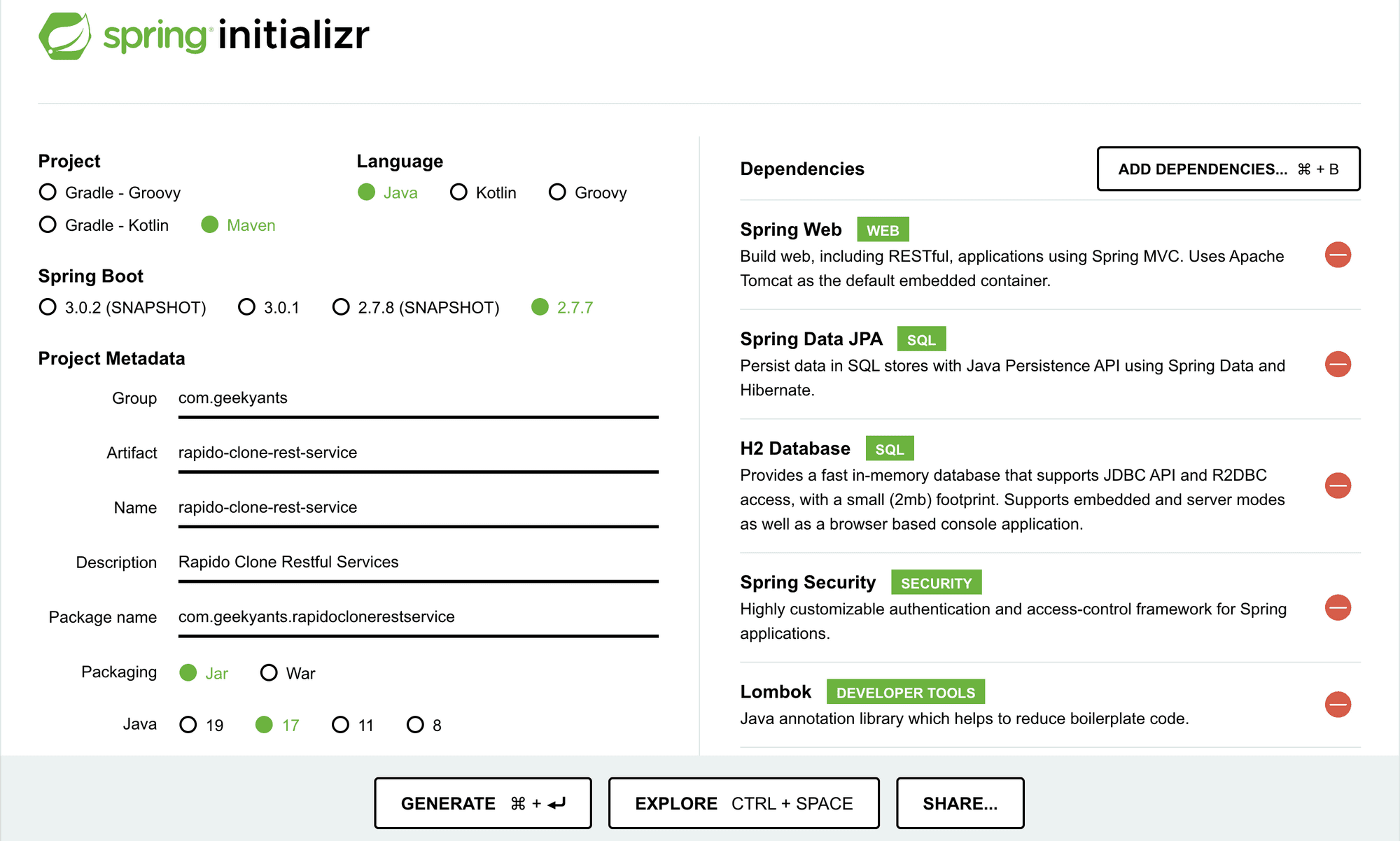
As shown in the image, the build automation tool we are using is maven which is widely used in the spring boot community, Spring Boot version 2.7.3 and Java version 18 are used in the project.
We have added a few dependencies like Spring Web, Spring Data JPA etc. are the required dependencies in the project.
User Registration
- Login with Phone Number
Using Twilio integrated at the backend, phone number are authenticated using OTP generated by Twilio which is verified at the backend and a JWT token is generated which allows users to login to the Ridde Application.
Twilio has been integrated in the backend using it’s SDK
<dependency>
		<groupId>com.twilio.sdk</groupId>
		<artifactId>twilio</artifactId>
		<version>7.34.0</version>
</dependency>
With account creation at Twilio, we’ll be provided with accountSid, authToken and trialNumber which are store in application.properties file with their respective names and is used as shown in below snippet:
application.properties
twilio.account_sid=AC603d276c178009dda7597ae5611fd689
twilio.auth_token=19c03a584f77bffe08c01e909b958350
twilio.trial_number=+19498066855
Twilio Model
@Configuration
@ConfigurationProperties(prefix = "twilio")
@Data
public class TwilioConfig {
    private String accountSid;
    private String authToken;
    private String trialNumber;
}
Twilio Configuration
@PostConstruct
public void initTwilio(){
	Twilio.init(twilioConfig.getAccountSid(),twilioConfig.getAuthToken());
}
OTP Generation Code
public String generateOtp(String phoneNo) {
  PhoneNumber to = new PhoneNumber(phoneNo);
  PhoneNumber from = new PhoneNumber(twilioConfig.getTrialNumber());
  String otp = getRandomOTP(phoneNo);
  String otpMessage = "Dear Customer , Your OTP is " + otp + ". Use this otp to log in to Ridde Application";
  Message message = Message.creator(to, from, otpMessage).create();

  return otp;
}
OTP Verification Code
public User verifyOtp(String otp, String phoneNo, UserType userType) {
	if (otp.equals(otpService.getCacheOtp(phoneNo))) {
		String phone = phoneNo.substring(3);
		System.out.println(phone);
		User updatedUser = repository.findByUsername(phone);
		System.out.println(updatedUser);
		if (updatedUser == null) {
			updatedUser = new User();
			updatedUser.setUsername(phone);
			updatedUser.setCreatedDate(new Date());
			updatedUser.setPhoneNo(phoneNo);
			updatedUser.setPassword("");
			String password = passwordEncoder.encode(updatedUser.getPassword());
			updatedUser.setPassword(password);
			updatedUser.setUserType(userType);

			if (updatedUser.getUserType().toString().equals("PARTNER")) {
				Map<String, Object> data = new HashMap<String, Object>();

				data.put("name", updatedUser.getUsername());
				data.put("email", updatedUser.getEmail());
				data.put("contact", updatedUser.getPhoneNo());
				data.put("type", "employee");
				data.put("reference_id", "Employee " + updatedUser.getUsername());

				PaymentContact paymentContact = paymentContactService.createContact(data);
				updatedUser.setContact_id(paymentContact.getContactId());
			}

			updatedUser = repository.save(updatedUser);
		}
		otpService.clearOtp(phoneNo);

		return updatedUser;
	} else {
		throw new OtpNotFoundException("Otp is either expired or incorrect");
	}
}- Google Sign-in
Add the following line of code in the login_screen.dart file.
_getGoogleSigninButton() => Consumer(
        builder: (_, ref, __) {
          //listener
          ref.listen(authProvider, (prev, next) {
            if (next is GoogleLoginSuccessState) {
              Navigator.pushNamedAndRemoveUntil(
                context,
                HomeScreen.routeName,
                (route) => false,
              );
            } else if (next is AuthErrorState) {
              showSnackBar(context: context, message: next.error);
            }
          });
          //builder
          final state = ref.watch(authProvider);
          if (state is AuthLoadingState) {
            return const Center(
              child: CircularProgressIndicator(),
            );
          }
          return RiddeElevatedButtonWithIcon(
              color: kPhoneButtonColor,
              path: '$kIconAssetPath/google.svg',
              label: tr('connect_with_google'),
              onPressed: () {
                _signInWithGoogleButtonPressed(ref: ref);
              });
        },
      );
Future<void> _signInWithGoogleButtonPressed({required WidgetRef ref}) async {
try {
GoogleSignInAccount? googleSignIn = await _googleSignIn.signIn();
if (googleSignIn != null) {
GoogleSignInAuthentication? googleSignInAuthentication =
await googleSignIn.authentication;
AuthCredential credential = GoogleAuthProvider.credential(
accessToken: googleSignInAuthentication.accessToken,
idToken: googleSignInAuthentication.idToken,
);
String? idToken = googleSignInAuthentication.idToken;
ref.read(authProvider.notifier).googleLogin(idToken ?? '', "PARTNER");
final UserCredential user =
await FirebaseAuth.instance.signInWithCredential(credential);
}
} catch (e) {
print(e);
}
}To verify the generated id token with the backend, add the following line of code in auth_state.dart file.
Future<void> googleLogin(String? idTokenString, String userType) async {
    state = GoogleLoadingState();
    final loginResult =
        await _authRepository.verifyGoogleLogin(idTokenString, userType);
    loginResult.fold((l) {
      state = GoogleErrorState(error: l.message);
    }, (r) {
      state = GoogleLoginSuccessState(response: r);
    });
  }
@override
  Future<Either<AppError, AuthResponse>> verifyGoogleLogin(
      String? idTokenString, String userType) async {
    try {
      Response response = await _dio.post('/auth/verify/google', data: {
        "idTokenString": idTokenString,
        "userType": userType,
      });
      AuthResponse authResponse = AuthResponse.fromJson(response.data);
      if (authResponse.token.isNotEmpty) {
        _hiveProvider.saveToken(
          token: authResponse.token,
        );
        return Right(authResponse);
      }

      return const Left(
          AppError(appErrorType: AppErrorType.unauthorised, message: "Failed"));
    } on DioError catch (e) {
      logger.e(e.toString());

      return Left(
        AppError(
          appErrorType: AppErrorType.network,
          message: tr('network_error'),
        ),
      );
    } on Exception {
      return Left(
        AppError(
          appErrorType: AppErrorType.api,
          message: tr('unknown_error'),
        ),
      );
    }
  }
}
With Firebase authentication, an id-token is generated from the front end for that particular gmail account, which is verified at the backend, for which a JWT token is generated if the id-token is genuine.
For verifying the id-token, we need Google API Client Library; add this maven dependency in your pom.xml.
<dependency>
		<groupId>com.google.api-client</groupId>
		<artifactId>google-api-client</artifactId>
		<version>1.32.1</version>
</dependency>
Add the following line of code to your Controller Layer.
@RequestMapping(value = "/verify/google", method = RequestMethod.POST)
public Map<String, Object> verifyGoogleLogin(@RequestBody Map<String, Object> inputData){
	Map<String, Object> returnMap = new HashMap<String, Object>();

	try {
		User user = userService.verifyGoogleLogin(inputData);
		UserDetails userDetails = userService.loadUserByUsername(user.getUsername());
		String token = jwtTokenUtil.generateToken(userDetails);

		returnMap.put(Constant.DATA, user);
		returnMap.put(Constant.STATUS, Status.success);
		returnMap.put(Constant.TOKEN, token);
	} catch (Exception e) {
		logger.error(e.toString());
		returnMap.put(Constant.STATUS, Status.failed);
		returnMap.put(Constant.MESSAGE, e.getMessage());
	}

	return returnMap;
}
Service Implementation Layer
This is the most important layer, as it contains the logic for verifying id-token.
You can refer to this for more understanding: Verify Google token ID
@Override
public User verifyGoogleLogin(Map<String, Object> inputData) throws Exception {
	String idTokenString = inputData.get("idTokenString").toString();

	HttpTransport transport = new NetHttpTransport();
	JsonFactory jsonFactory = new GsonFactory();
	GoogleIdTokenVerifier verifier = new GoogleIdTokenVerifier.Builder(transport, jsonFactory)
			.setAudience(Collections.singletonList(
					"Client ID 1020385882135-kj6div4a85qiiqh61be7gctihoiu26uh.apps.googleusercontent.com"))
			.setIssuer("https://accounts.google.com").build();

	GoogleIdToken idToken = verifier.verify(idTokenString);

	if (idToken != null) {
		Payload payload = idToken.getPayload();
		System.out.println(payload);
		System.out.println(payload.getHostedDomain());

		String userId = payload.getSubject();
		System.out.println("User ID: " + userId);

		String email = payload.getEmail();
		String name = (String) payload.get("name");
		String pictureUrl = (String) payload.get("picture");
		String familyName = (String) payload.get("family_name");
		String givenName = (String) payload.get("given_name");

		byte[] fileContent = IOUtils.toByteArray(new URL(pictureUrl));

		String base64Url = Base64.getEncoder().encodeToString(fileContent);
		System.out.println(base64Url);

		User userSaved;

		User user = repository.findByUsername(name);
		if (user == null) {
			user = new User();
			user.setUsername(name);
			user.setCreatedDate(new Date());
			if (inputData.get("dob") == null) {
				user.setDob(null);
			} else {
				Date date = new SimpleDateFormat("dd-MM-yyyy").parse(inputData.get("dob").toString());
				user.setDob(date);
			}
			user.setLatitude(inputData.get("latitude") == null ? 0.0 : Double.parseDouble(inputData.get("latitude").toString()));
			user.setLongitude(inputData.get("longitude") == null ? 0.0 : Double.parseDouble(inputData.get("longitude").toString()));
			user.setFcm(inputData.get("fcm") == null ? null : inputData.get("fcm").toString());
			user.setFirstName(givenName);
			user.setLastName(familyName);
			user.setEmail(email);
			user.setPhoneNo(inputData.get("phoneNo") == null ? null : inputData.get("phoneNo").toString());
			user.setPassword("");
			String password = passwordEncoder.encode(user.getPassword());
			user.setPassword(password);
			user.setCountry(inputData.get("country") == null ? null : inputData.get("country").toString());
			user.setUserType(inputData.get("userType").toString().equals("CLIENT") ? UserType.CLIENT : UserType.PARTNER);
			user.setGender(inputData.get("gender") == null ? null : inputData.get("gender").toString().equals("MALE") ? Gender.MALE : Gender.FEMALE);
			user.setImage(base64Url);

			if (user.getUserType().toString().equals("PARTNER")) {
				Map<String, Object> data = new HashMap<String, Object>();

				data.put("name", user.getUsername());
				data.put("email", user.getEmail());
				data.put("contact", user.getPhoneNo());
				data.put("type", "employee");
				data.put("reference_id", "Employee " + name);

				PaymentContact paymentContact = paymentContactService.createContact(data);
				user.setContact_id(paymentContact.getContactId());
			}

			userSaved = repository.save(user);
		} else {
			user.setUsername(name);
			if (inputData.get("dob") == null) {
				user.setDob(null);
			} else {
				Date date = new SimpleDateFormat("dd-MM-yyyy").parse(inputData.get("dob").toString());
				user.setDob(date);
			}
			user.setLatitude(inputData.get("latitude") == null ? 0.0 : Double.parseDouble(inputData.get("latitude").toString()));
			user.setLongitude(inputData.get("longitude") == null ? 0.0 : Double.parseDouble(inputData.get("longitude").toString()));
			user.setFcm(inputData.get("fcm") == null ? null : inputData.get("fcm").toString());
			user.setFirstName(givenName);
			user.setLastName(familyName);
			user.setEmail(email);
			user.setPhoneNo(inputData.get("phoneNo") == null ? null : inputData.get("phoneNo").toString());
			user.setCountry(inputData.get("country") == null ? null : inputData.get("country").toString());
			user.setUserType(inputData.get("userType").toString().equals("CLIENT") ? UserType.CLIENT : UserType.PARTNER);
			user.setGender(inputData.get("gender") == null ? null : inputData.get("gender").toString().equals("MALE") ? Gender.MALE : Gender.FEMALE);
			user.setImage(base64Url);

			userSaved = repository.save(user);
		}

		return userSaved;
	} else {
		throw new ResourceNotFoundException("Id token", "idTokenString", "Invalid id token");
	}
}
Implementing Web Socket on the server side with Spring Boot
Implementing the WebSocket server-side with Spring Boot is not a very complex task and includes only a couple of steps, which we will walk through individually.
Step 1: First, we must add the maven dependencies required for web sockets.
<dependency>
		<groupId>org.springframework</groupId>
		<artifactId>spring-websocket</artifactId>
		<version>5.3.22</version>
</dependency>
<dependency>
		<groupId>org.springframework</groupId>
		<artifactId>spring-messaging</artifactId>
		<version>5.3.22</version>
</dependency>
Step 2: Then, we can configure Spring to enable WebSocket and STOMP messaging.
@Configuration
@EnableWebSocketMessageBroker
public class WebSocketConfig implements WebSocketMessageBrokerConfigurer {
    @Override
    public void registerStompEndpoints(StompEndpointRegistry registry) {
        registry.addEndpoint("/socket").withSockJS();
    }
    @Override
    public void configureMessageBroker(MessageBrokerRegistry config) {
        config.enableSimpleBroker("/topic");
        config.setApplicationDestinationPrefixes("/app");
    }
}
The method configureMessageBroker does two things:
- Creates the in-memory message broker with one or more destinations for message transfers.
- Defines the prefix app that is used to filter destinations handled by methods annotated with @MessageMapping, which you will implement in a controller. The controller, after processing the message, will send it to the broker.
Going back to the snippet above, you must have noticed a call to the method withSockJS(), it will let our WebSockets work even if an internet browser does not support the WebSocket protocol.
Step 3: Implement a controller that will handle user requests
@MessageMapping("/ridenow")
@SendTo("/topic/tripride")
public void rideNowWebSocket(String message) {
  return message;
}
Instead of the annotation @SendTo, you can also use SimpMessagingTemplate which you can @Autowire inside your controller.
@MessageMapping("/ridenow") public void rideNowWebSocket(String message) {
	this.simpMessagingTemplate.convertAndSend("/topic/tripride", message)
}
Setting up Firebase Cloud Messaging
Firebase Cloud Messaging
Firebase Cloud Messaging, or FCM for short, is a cloud-based messaging service that provides the following capabilities
- Reliably send messages to mobile or web applications, referred to as “clients.”
- Send messages to all or specific clients using topic or subscription-based addressing
- Receive messages from clients in a server application
The different ways we can send notifications to our vast user base i.e publish notifications to a topic, publish notifications to specific clients, publish notifications to multiple topics.
In our project, we’ll be using FCM tokens for push notifications. Now that we have our Firebase project ready, it's time to code the server component that will send notifications.
Step 1: Include the Firebase-SDK
<dependency>
		<groupId>com.google.firebase</groupId>
		<artifactId>firebase-admin</artifactId>
		<version>9.0.0</version>
</dependency>
Step 2: Get the Service Account Private Key from FCM Console
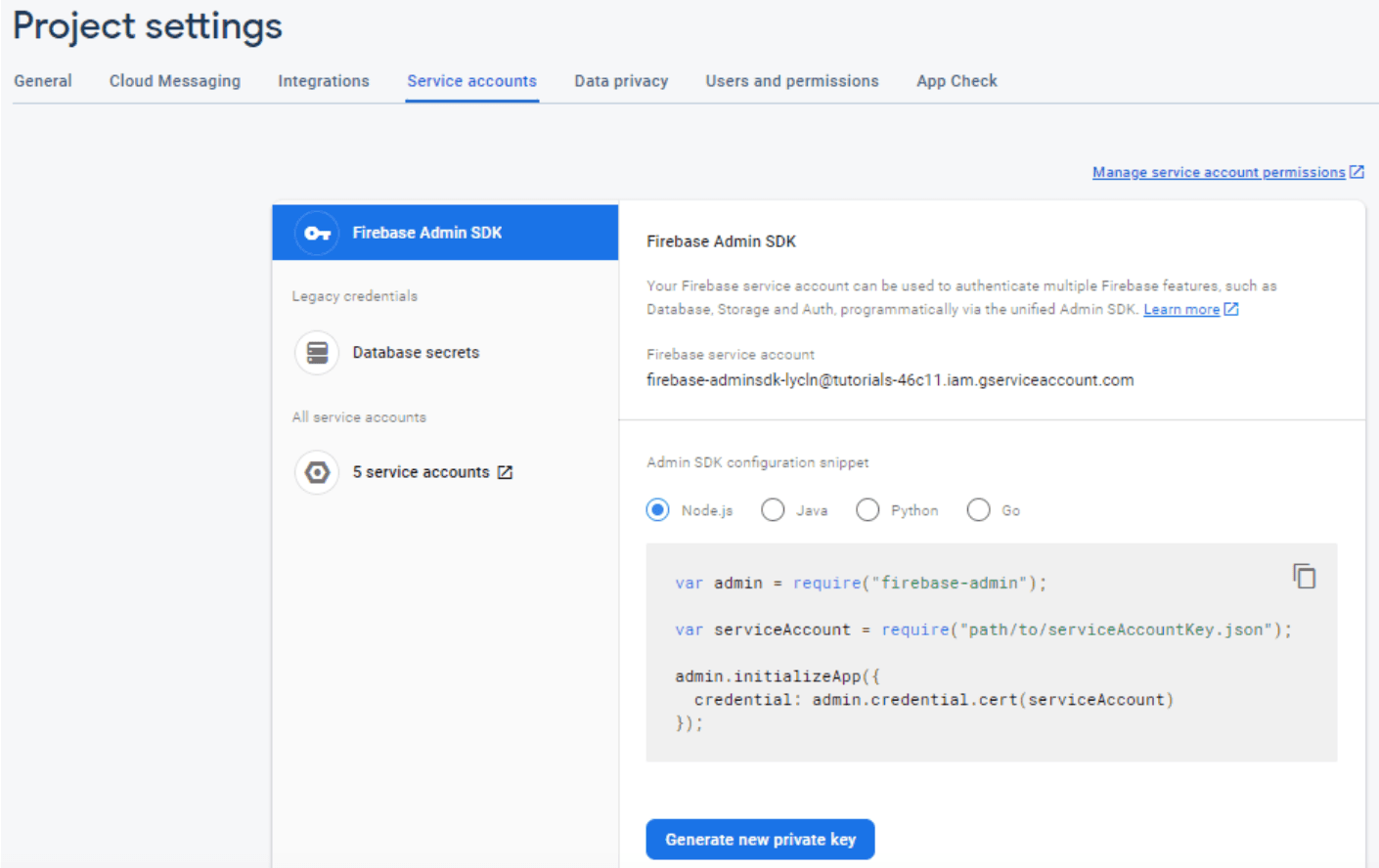
This will download a file as -firebase-adminsdk-.json. Save this file in src/java/resources/fcm folder.
In your application.properties file create key/value like app.firebase-configuration-file=fcm/rapidoclone-360406-firebase-adminsdk-yv3qw-9b136ae55a.json
Step 3: Initialize the Firebase application; for this we need a private key location so to access the location, we can use @Value annotation with key name. Create class FCMConfig.java
@Service
public class FCMConfig {

    @Value("${app.firebase-configuration-file}")
    private String firebaseConfigPath;

    Logger logger = LoggerFactory.getLogger(FCMConfig.class);

    @PostConstruct
    public void initialize() {
        try {
            FirebaseOptions options = FirebaseOptions.builder().setCredentials(GoogleCredentials.fromStream(new ClassPathResource(firebaseConfigPath).getInputStream())).build();
            if (FirebaseApp.getApps().isEmpty()) {
                FirebaseApp.initializeApp(options);
                logger.info("Firebase application has been initialized");
            }
        } catch (IOException e) {
            logger.error(e.getMessage());
        }
    }
}
In the above code snippets, initialize() method starts up due to @PostConstruct annotation.
Step 4: Create Class FCMService with @Service annotation containing different types of methods.
@Service
public class FCMService {
    private Logger logger = LoggerFactory.getLogger(FCMService.class);

    public void sendMessage(Map<String, String> data, PushNotificationRequest request)
            throws InterruptedException, ExecutionException {
        Message message = getPreconfiguredMessageWithDataAndTopic(data, request);
        Gson gson = new GsonBuilder().setPrettyPrinting().create();
        String jsonOutput = gson.toJson(message);
        String response = sendAndGetResponse(message);
        logger.info("Sent message with data. Topic: " + request.getTopic() + ", " + response+ " msg "+jsonOutput);
    }
    public void sendMessageWithoutData(PushNotificationRequest request)
            throws InterruptedException, ExecutionException {
        Message message = getPreconfiguredMessageWithoutData(request);
        String response = sendAndGetResponse(message);
        logger.info("Sent message without data. Topic: " + request.getTopic() + ", " + response);
    }
    public void sendMessageToToken(PushNotificationRequest request)
            throws InterruptedException, ExecutionException {
        Message message = getPreconfiguredMessageToToken(request);
        Gson gson = new GsonBuilder().setPrettyPrinting().create();
        String jsonOutput = gson.toJson(message);
        String response = sendAndGetResponse(message);
        logger.info("Sent message to token. Device token: " + request.getToken() + ", " + response+ " msg "+jsonOutput);
    }
    public void sendMessageToTokenWithData(Map<String, String> data, PushNotificationRequest request)
            throws InterruptedException, ExecutionException {
        Message message = getPreconfiguredMessageWithData(data,request);
        Gson gson = new GsonBuilder().setPrettyPrinting().create();
        String jsonOutput = gson.toJson(message);
        String response = sendAndGetResponse(message);
        logger.info("Sent message to token. Device token: " + request.getToken() + ", " + response+ " msg "+jsonOutput);
    }
    private String sendAndGetResponse(Message message) throws InterruptedException, ExecutionException {
        return FirebaseMessaging.getInstance().sendAsync(message).get();
    }
    private Message getPreconfiguredMessageToToken(PushNotificationRequest request) {
        return getPreconfiguredMessageBuilder(request).setToken(request.getToken())
                .build();
    }
    private Message getPreconfiguredMessageWithoutData(PushNotificationRequest request) {
        return getPreconfiguredMessageBuilder(request).setTopic(request.getTopic())
                .build();
    }
    private Message getPreconfiguredMessageWithData(Map<String, String> data, PushNotificationRequest request) {
        return getPreconfiguredMessageBuilder(request).putAllData(data).setToken(request.getToken())
                .build();
    }
    private Message getPreconfiguredMessageWithDataAndTopic(Map<String, String> data, PushNotificationRequest request) {
        return getPreconfiguredMessageBuilder(request).putAllData(data).setTopic(request.getTopic())
                .build();
    }
    private Message.Builder getPreconfiguredMessageBuilder(PushNotificationRequest request) {
        AndroidConfig androidConfig = getAndroidConfig(request.getTopic());
        ApnsConfig apnsConfig = getApnsConfig(request.getTopic());
        Notification notification = Notification
                .builder()
                .setTitle(request.getTitle())
                .setBody(request.getMessage())
                .build();
        return Message.builder()
                .setApnsConfig(apnsConfig).setAndroidConfig(androidConfig).setNotification(
                        notification);
    }
    private AndroidConfig getAndroidConfig(String topic) {
        return AndroidConfig.builder()
                .setTtl(Duration.ofMinutes(2).toMillis()).setCollapseKey(topic)
                .setPriority(AndroidConfig.Priority.HIGH)
                .setNotification(AndroidNotification.builder().setSound(NotificationParameter.SOUND.getValue())
                        .setColor(NotificationParameter.COLOR.getValue()).setTag(topic).build()).build();
    }
    private ApnsConfig getApnsConfig(String topic) {
        return ApnsConfig.builder()
                .setAps(Aps.builder().setCategory(topic).setThreadId(topic).build()).build();
    }
}
Step 5: Create class PushNotificationService, which contains methods to send push notifications to topic subscriptions or FCM tokens.
@Service
public class PushNotificationService {

    @Autowired
    private FCMService fcmService;

	  public void sendPushNotificationToPartnerToken(Trip trip, String title, String message) throws ExecutionException, InterruptedException {
        Long driverId = trip.getDriverId();
        User user = userService.getUserDetailByUserId(driverId);
        String fcm = user.getFcm();

        PushNotificationRequest notificationRequest = new PushNotificationRequest();
        notificationRequest.setTitle(title);
        notificationRequest.setMessage(message);
        notificationRequest.setToken(fcm);

        String json =new Gson().toJson(trip);
        Type type = new TypeToken<Map<String, String>>(){}.getType();
        Map<String,String> dataMap = new Gson().fromJson(json,type);
        fcmService.sendMessageToTokenWithData(dataMap, notificationRequest);
    }
}
Step 6: Create two files under the model layer PushNotificationRequest.java with columns title, message, topic, and token and PushNotificationResponse.java with columns status and message, and with the help of this configuration, we would be sending push notifications from the controller layer.
Now for displaying the notifications on the front end, the following line of code in home.dart file.
 // init firebase background message handler
    FirebaseMessaging.onMessageOpenedApp.listen((RemoteMessage message) {
      Trip trip = Trip.fromJsonString(message.data);
      _showConfirmDialog(trip: trip);
    });
void _forGroundMessageHandler() {
FirebaseMessaging.onMessage.listen((RemoteMessage message) {
Trip trip = Trip.fromJsonString(message.data);
_showConfirmDialog(trip: trip);
});
}Ride Now and Package Delivery
Ride Now UI
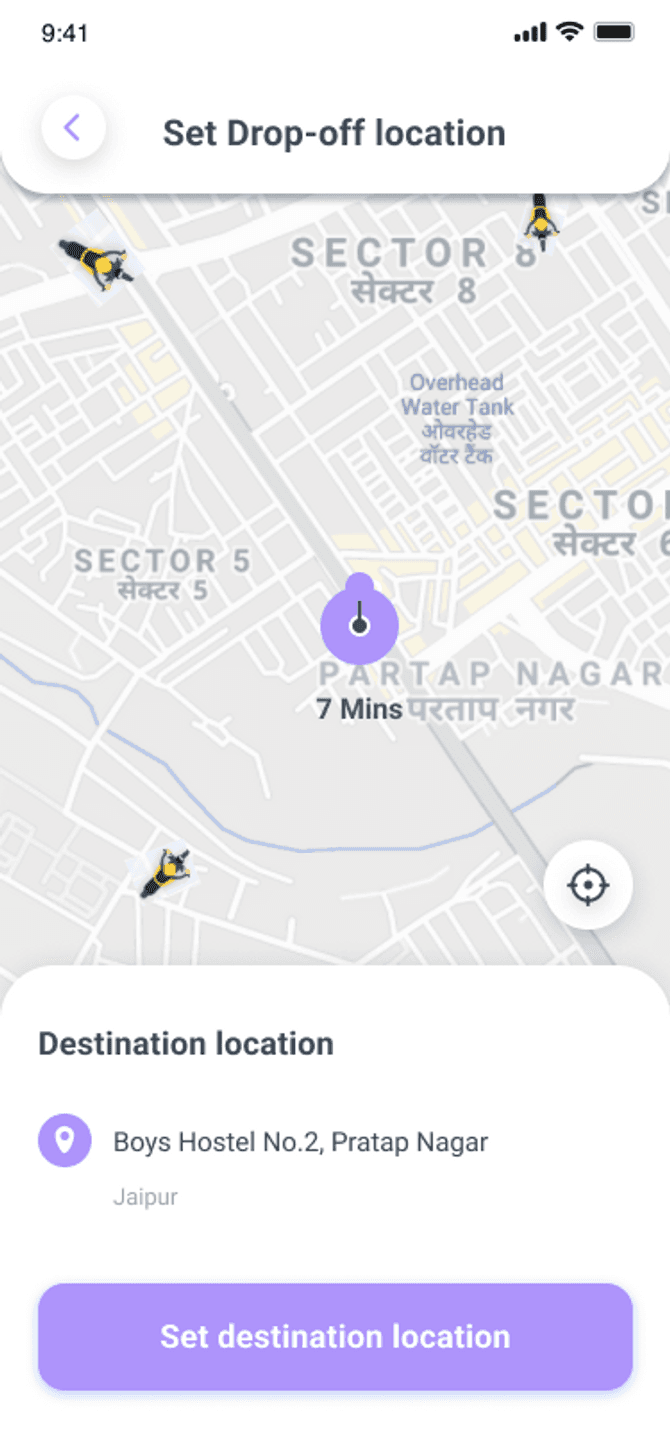
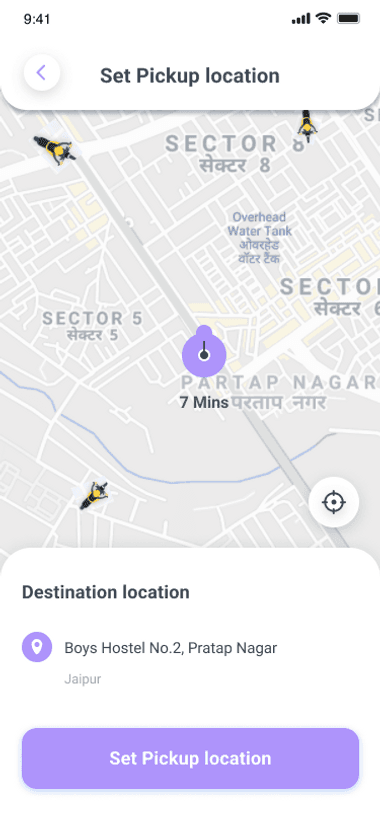
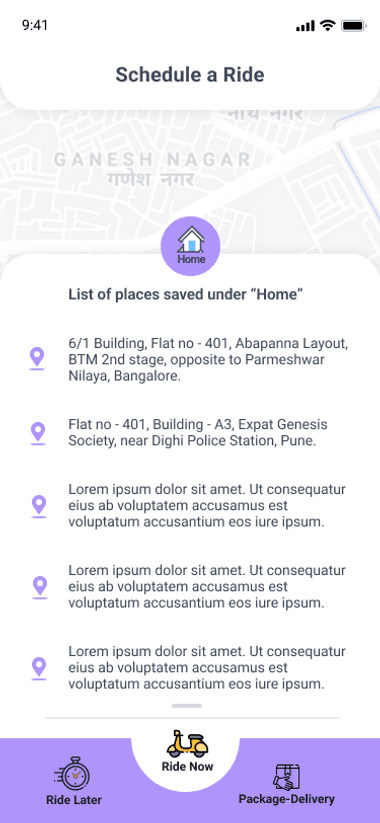
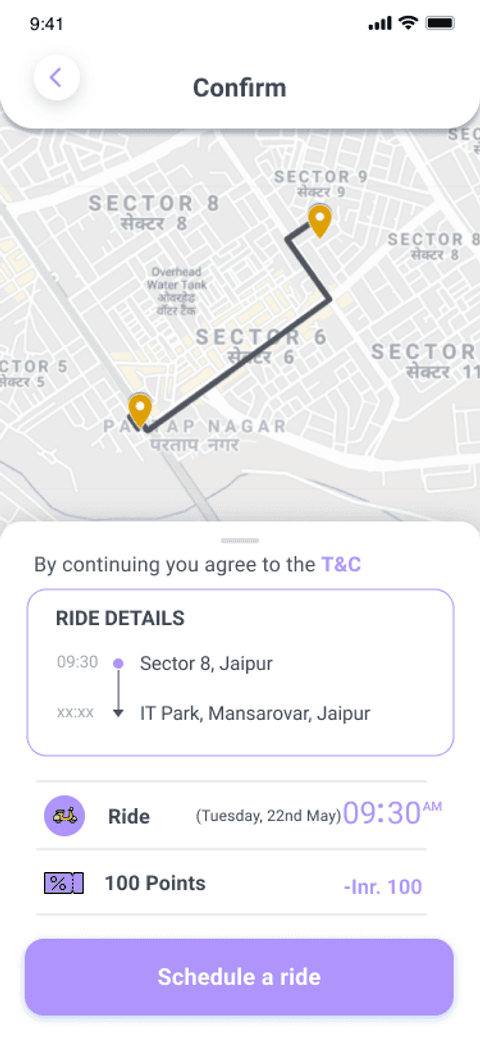
Package Delivery UI
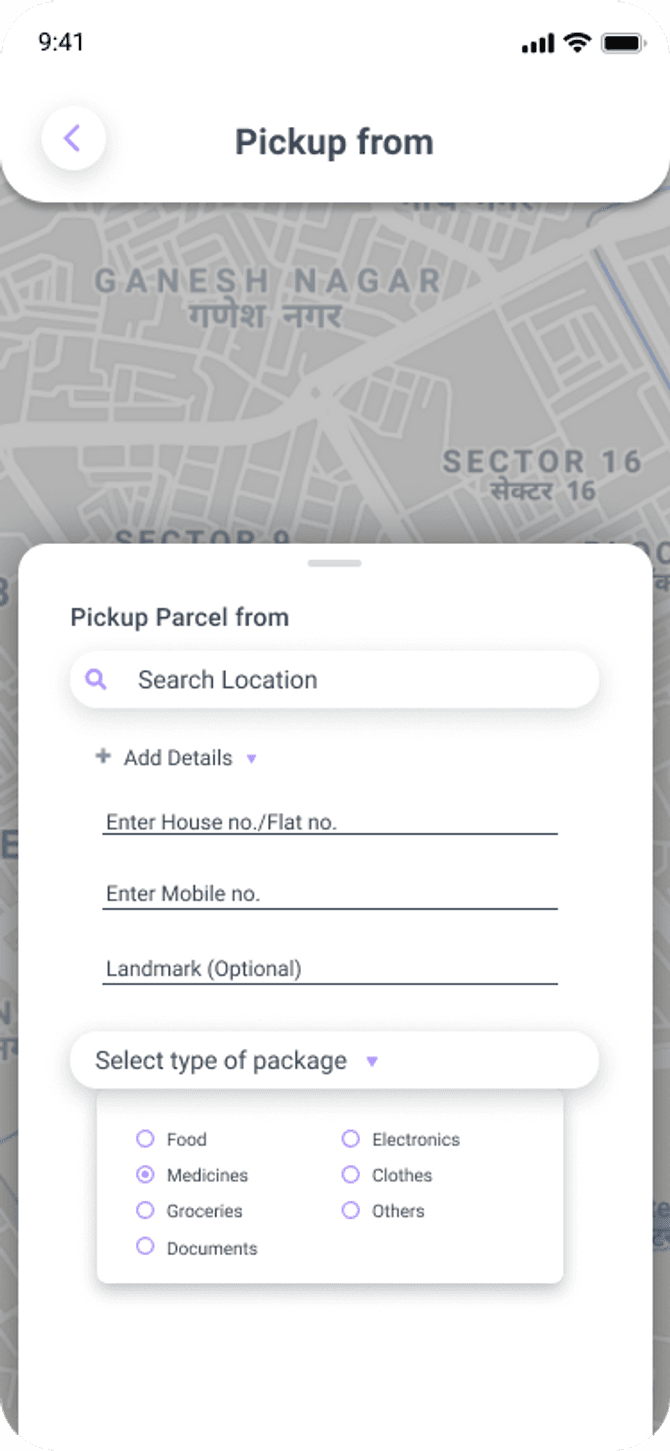
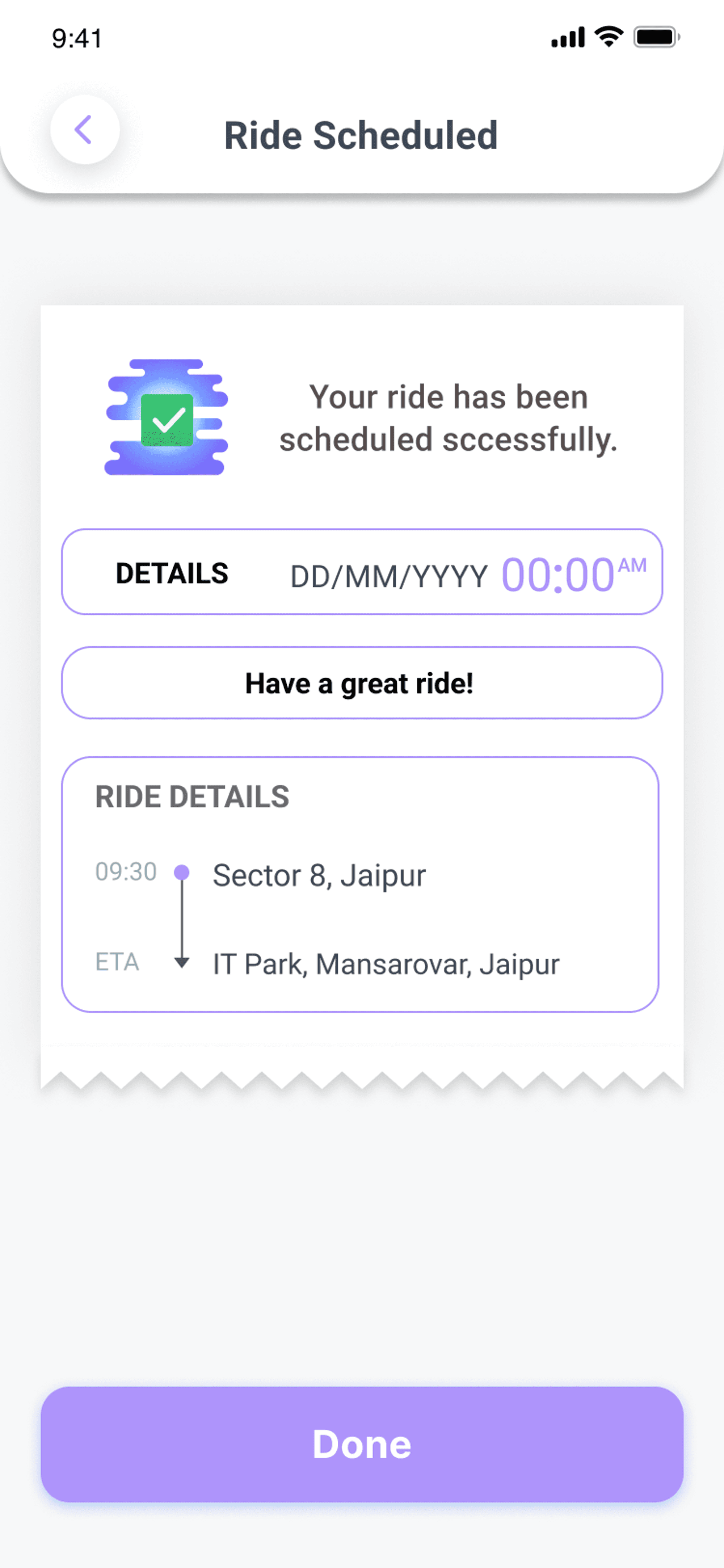
So now as we have a basic understanding of Web Sockets and Firebase Cloud Messaging, let’s start building Ride Now and Package Delivery functionality for the backend first.
We’ll create a POST API for booking or cancelling a Ride Now and Package Delivery so let’s see what our API will look like.
Add the following code in our Controller Layer.
@RequestMapping(value = "/book/packagedelivery", method = RequestMethod.POST) public Map<String, Object> bookRideNowAndPackageDelivery(@RequestBody Trip trip){
	Map<String, Object> returnMap = new HashMap<>();

	try {
		Trip tripSaved = userService.bookRideNowAndPackageDelivery(trip);
		if(tripSaved.getTripStatus().equals(Constant.TRIP_PENDING)) {
			returnMap.put(Constant.MESSAGE, tripSaved.getRideType() + " request successfully booked");
		} else {
			returnMap.put(Constant.MESSAGE, tripSaved.getRideType() + " request has been cancelled");
		}
		returnMap.put(Constant.STATUS, Status.success);
		returnMap.put(Constant.DATA, tripSaved);
		}
		catch (Exception e) {
			logger.error(e.toString());
			returnMap.put(Constant.STATUS, Status.failed);
			returnMap.put(Constant.MESSAGE, e.getMessage());
	}

	return returnMap;
}
Service Implementation Layer
The service implementation layer consists of two methods :
- sendNotificationToDrivers
sendNotificationToDrivers sends push notifications to drivers within the range of 11 KM and notifies the nearest available driver for the requested trips by the users, if no driver is found within the range, then we simply respond No driver found in your area, please try again in some time.
- checkTripStatus
checkTripStatus keeps checking the trip status at an interval of 60 seconds till the driver accepts the trip else will notify the user All drivers are busy right now after 5 minutes of Pending status.
@Override
public Trip bookRideNowAndPackageDelivery(Trip trip) throws Exception {

		Trip tripSaved;
		if (trip.getTripStatus().equals(Constant.TRIP_CANCELLED)) {
            logger.info("Trip cancelled by user");
			tripSaved = tripService.updateTrip(trip);

			if (tripSaved.getDriverId() != null) {
            	logger.info("Trip cancelled by user, sending notification to driver");
				pushNotificationService.sendPushNotificationToPartnerToken(tripSaved, trip.getRideType().toString(), "Captain, Request has been cancelled");
			}
		} else {
            logger.info("Notification sent to near by drivers");
			tripSaved = tripService.saveTrip(trip);
			Set<String> fcmTokenList = sendNotificationToDrivers(tripSaved);
			System.out.println("fcmTokenList " + fcmTokenList);
			System.out.println();
			checkTripStatus(tripSaved, fcmTokenList);
		}

		return tripSaved;
	}
sendNotificationToDrivers
private Set<String> sendNotificationToDrivers(Trip trip) throws Exception {
	Set<String> fcmTokenList = new HashSet<>();

	List<User> drivers1 = repository.getNearByPartner(trip.getSourceLat(), trip.getSourceLng(), 5);
	List<User> drivers2 = repository.getNearByPartner(trip.getSourceLat(), trip.getSourceLng(), 7);
	List<User> drivers3 = repository.getNearByPartner(trip.getSourceLat(), trip.getSourceLng(), 9);
	List<User> drivers4 = repository.getNearByPartner(trip.getSourceLat(), trip.getSourceLng(), 11);

	if(!drivers1.isEmpty()) {
		drivers1.stream().forEach((driver) -> {
			System.out.println("driver " + driver.getUsername());
			try {
				pushNotificationService.sendPushNotificationToToken(driver.getFcm(), trip, trip.getRideType().toString() + " Request", "Captain, We have found a request near you");
			} catch (InterruptedException | ExecutionException e) {
				e.printStackTrace();
			}
			fcmTokenList.add(driver.getUsername());
		});
	}
	else if(!drivers2.isEmpty()) {
		drivers2.stream().forEach((driver) -> {
			System.out.println("driver " + driver.getUsername());
			try {
				pushNotificationService.sendPushNotificationToToken(driver.getFcm(), trip, trip.getRideType().toString(), "Captain, We have found a request near you");
			} catch (InterruptedException | ExecutionException e) {
				e.printStackTrace();
			}
			fcmTokenList.add(driver.getUsername());
		});
	}
	else if(!drivers3.isEmpty()) {
		drivers3.stream().forEach((driver) -> {
			System.out.println("driver " + driver.getUsername());
			try {
				pushNotificationService.sendPushNotificationToToken(driver.getFcm(), trip, trip.getRideType().toString(), "Captain, We have found a request near you");
			} catch (InterruptedException | ExecutionException e) {
				e.printStackTrace();
			}
			fcmTokenList.add(driver.getUsername());
		});
	}
	else if(!drivers4.isEmpty()) {
		drivers4.stream().forEach((driver) -> {
			System.out.println("driver " + driver.getUsername());
			try {
				pushNotificationService.sendPushNotificationToToken(driver.getFcm(), trip, trip.getRideType().toString(), "Captain, We have found a request near you");
			} catch (InterruptedException | ExecutionException e) {
				e.printStackTrace();
			}
			fcmTokenList.add(driver.getUsername());
		});
	}
	else {
		trip.setTripStatus(Constant.TRIP_CANCELLED);
		tripService.saveTrip(trip);
		throw new Exception("No driver found in your area, please try again in some time");
	}

	return fcmTokenList;
}
checkTripStatus
private void checkTripStatus(Trip trip, Set<String> fcmTokenList) {
	Timer timer = new Timer();
	timer.scheduleAtFixedRate(new TimerTask(){
		int count = 0;
		int distance = 5;

	    @OverrideF
	    public void run() {
	    	Trip tripSaved = tripService.getTripDetailByTripId(trip.getTripId());
	    	if(count < 4 || tripSaved.getTripStatus().equals(Constant.TRIP_ACCEPTED)) {

				System.out.println("Trip status " + tripSaved.getTripStatus());
				System.out.println("fcmTokenList " + fcmTokenList);
				if (tripSaved.getTripStatus().equals(Constant.TRIP_PENDING) && !fcmTokenList.isEmpty()) {
					System.out.println("distance " + distance);
					List<User> users = repository.getNearByPartner(trip.getSourceLat(), trip.getSourceLng(), distance);
					System.out.println("users " + users);
					users.stream().forEach((user) -> {
						if(!fcmTokenList.contains(user.getUsername())) {

							System.out.println("new drivers " + user.getUsername());
							try {
								pushNotificationService.sendPushNotificationToToken(user.getFcm(), trip, trip.getRideType().toString(), "Captain, We have found a request near you");
							} catch (InterruptedException | ExecutionException e) {
								e.printStackTrace();
							}
							fcmTokenList.add(user.getUsername());
						}
					});
					distance = distance + 2;
				}
				else {
					System.out.println("Trip accepted by someone");
					fcmTokenList.clear();
		    		System.out.println("fcmTokenList " + fcmTokenList);
		    		timer.cancel();
				}
				count++;
	    	}
	    	else {
	    		fcmTokenList.clear();
	    		System.out.println("fcmTokenList " + fcmTokenList);
	    		trip.setTripStatus(Constant.TRIP_CANCELLED);
	    		tripService.saveTrip(trip);
				System.out.println("All drivers are busy right now, please try again in some time");
				try {
					pushNotificationService.sendPushNotificationToUserToken(trip, trip.getRideType().toString(), "All drivers are busy right now");
				} catch (ExecutionException | InterruptedException e) {
					e.printStackTrace();
				}
	    		timer.cancel();
		    }
	    	System.out.println();
	    }
	},60000,60000);
}
Below is an API that updates the status to Accepted when the driver confirms a trip and also notifies the user of the same.
Controller Layer
@RequestMapping(value = "/send/user/notification", method = RequestMethod.POST)
public Map<String, Object> sendPushNotificationToUserForPackageDelivery(@RequestBody Trip trip){
	Map<String, Object> returnMap = new HashMap<>();

	try {
		Trip tripSaved = tripService.getTripDetailByTripId(trip.getTripId());
		if (tripSaved.getTripStatus().equals(Constant.TRIP_PENDING)) {
			Trip tripUpdated = tripService.updateTrip(trip);
			logger.info("Updated trip data " + tripUpdated);
			pushNotificationService.sendPushNotificationToUserToken(tripUpdated, tripUpdated.getRideType() + " Request", "Great, Your request is accepted " + trip.getDriverUsername());
			tripUpdated.setTripStatus(Constant.TRIP_DRIVER_TO_USER_INPROGRESS);
			System.out.println(tripUpdated);
			returnMap.put(Constant.DATA, tripUpdated);
			returnMap.put(Constant.STATUS, Status.success);
		} else if (tripSaved.getTripStatus().equals(Constant.TRIP_ACCEPTED)) {
			logger.info("Ride has been accepted by another driver already");
			returnMap.put(Constant.STATUS, Status.failed);
			returnMap.put(Constant.MESSAGE, "Ride has been accepted by another driver already");
		} else {
			logger.info("Ride has been cancelled by the user");
			returnMap.put(Constant.STATUS, Status.failed);
			returnMap.put(Constant.MESSAGE, "Ride has been cancelled by the user");
		}
	} catch (Exception e) {
		logger.error(e.toString());
		returnMap.put(Constant.STATUS, Status.failed);
		returnMap.put(Constant.MESSAGE, e.getMessage());
	}

	return returnMap;
}
Web Socket for Ride Now [Backend]
@MessageMapping("/ridenow")
public void bookRideNow(@RequestBody Trip trip) {
	 Map<String, Object> returnMap = new HashMap<>();

     try {
    	Trip tripDB = tripService.getTripDetailByTripId(trip.getTripId());
    	if(tripDB.getTripStatus().equals(Constant.TRIP_CANCELLED)) {
    		returnMap.put(Constant.DATA, tripDB);
    		returnMap.put(Constant.STATUS, Status.success);
    		returnMap.put(Constant.MESSAGE, "Ride has been cancelled by " + tripDB.getUsername());
    	}
    	else {
		Trip tripSaved = tripService.updateTrip(trip);
		System.out.println("Trip Updated Data " + tripSaved);

		switch (tripSaved.getTripStatus()) {

		case Constant.TRIP_DRIVER_TO_USER_STARTED:
			returnMap.put(Constant.MESSAGE, "Great, driver has left to pick you");
			logger.info("Inside TRIP_DRIVER_TO_USER_STARTED");
			break;

		case Constant.TRIP_DRIVER_TO_USER_INPROGRESS:
			returnMap.put(Constant.MESSAGE, "Great, Your driver is on his way to pick you");
			logger.info("Inside TRIP_DRIVER_TO_USER_INPROGRESS");
			break;

		case Constant.TRIP_PICKUP_TO_DROP_STARTED:
			returnMap.put(Constant.MESSAGE, "Great, Your ride to destination started");
			logger.info("Inside TRIP_PICKUP_TO_DROP_STARTED");
			break;

		case Constant.TRIP_PICKUP_TO_DROP_INPROGRESS:
			returnMap.put(Constant.MESSAGE, "Great, Your ride to destination inprogress");
			logger.info("Inside TRIP_PICKUP_TO_DROP_INPROGRESS");
			break;

		case Constant.TRIP_FINISHED:
			pushNotificationService.sendPushNotificationToPartnerToken(tripSaved, "Trip Finished", "You have arrived to the destination, please collect the amount");
			pushNotificationService.sendPushNotificationToUserToken(tripSaved, "Trip Finished", "You have arrived to the destination, please pay the amount");
			returnMap.put(Constant.MESSAGE, "Great, You have arrived to the destination");
			logger.info("Inside TRIP_FINISHED");
			break;

		default:
			returnMap.put(Constant.MESSAGE, "Please send valid trip status");
			break;

		}

		returnMap.put(Constant.DATA, tripSaved);
		returnMap.put(Constant.STATUS, Status.success);
    	}
     }

     catch (Exception e) {
         logger.error(e.toString());
         returnMap.put(Constant.STATUS, Status.failed);
         returnMap.put(Constant.MESSAGE, e.getMessage());
     }

     messagingTemplate.convertAndSend("/topic/" + trip.getUsername()  + "-" + trip.getDriverUsername() + "/tripride" , returnMap);
}
Web Socket for Package Delivery
@MessageMapping("/ridepackage")
public void bookPackageDeliveryRideViaWebSocket(Trip trip){
    Map<String, Object> returnMap = new HashMap<String, Object>();

    try {
    	Trip tripDB = tripService.getTripDetailByTripId(trip.getTripId());
    	if(tripDB.getTripStatus().equals(Constant.TRIP_CANCELLED)) {
    		returnMap.put(Constant.DATA, tripDB);
    		returnMap.put(Constant.STATUS, Status.success);
    		returnMap.put(Constant.MESSAGE, "Ride has been cancelled by " + tripDB.getUsername());
    	}
    	else {
		Trip tripSaved = tripService.updateTrip(trip);
		System.out.println("Trip Updated Data " + tripSaved);

		switch (tripSaved.getTripStatus()) {

		case Constant.TRIP_DRIVER_TO_USER_STARTED:
			returnMap.put(Constant.MESSAGE, "Great, driver has left to pick your package");
			logger.info("Inside TRIP_DRIVER_TO_USER_STARTED");
			break;

		case Constant.TRIP_DRIVER_TO_USER_INPROGRESS:
			returnMap.put(Constant.MESSAGE, "Great, Your driver is on his way to pick your package");
			logger.info("Inside TRIP_DRIVER_TO_USER_INPROGRESS");
			break;

		case Constant.TRIP_PICKUP_TO_DROP_STARTED:
			returnMap.put(Constant.MESSAGE, "Great, Your driver has picked the package and on his way to deliver");
			logger.info("Inside TRIP_PICKUP_TO_DROP_STARTED");
			break;

		case Constant.TRIP_PICKUP_TO_DROP_INPROGRESS:
			returnMap.put(Constant.MESSAGE, "Great, Your driver is in progress to deliver the package");
			logger.info("Inside TRIP_PICKUP_TO_DROP_INPROGRESS");
			break;

		case Constant.TRIP_FINISHED:
			pushNotificationService.sendPushNotificationToPartnerToken(tripSaved, "Trip Finished", "Hi, You have arrived to the destination, please deliver the package");
			pushNotificationService.sendPushNotificationToUserToken(tripSaved, "Trip Finished", "Driver has reached to the destination, please collect the package");
			returnMap.put(Constant.MESSAGE, "Great, Captain has reached to the destination, Please collect the package");
			logger.info("Inside TRIP_FINISHED");
			break;

		default:
			returnMap.put(Constant.MESSAGE, "Please send valid trip status");
			break;

		}

		returnMap.put(Constant.DATA, tripSaved);
		returnMap.put(Constant.STATUS, Status.success);
		returnMap.put(Constant.MESSAGE, "updatedUser");
    	}
    }

    catch (Exception e) {
        logger.error(e.toString());
        returnMap.put(Constant.STATUS, Status.failed);
        returnMap.put(Constant.MESSAGE, e.getMessage());
    }

    messagingTemplate.convertAndSend("/topic/" + trip.getUsername()  + "-" + trip.getDriverUsername() + "/trippackage" , returnMap);
}
That was all for the backend part of Ride Now and Package Delivery functionality.
Now, let's understand the frontend part
when the user selects the Ride Now tab a bottom sheet will appear where he/she can fill in the pickup and drop-off details.
Add the following line of code to get the source text field.
 _getSourceTextField() => StreamBuilder<Position>(
      stream: _positionStream,
      builder: (context, snapshot) {
        Position? position = snapshot.data;
        if (_sourceTextController.text.isEmpty && position != null) {
          placemarkFromCoordinates(position.latitude, position.longitude)
              .then((value) {
            _sourceTextController.text = value[0].street ?? '';
            _locationDetail.sourceLat = position.latitude;
            _locationDetail.sourceLong = position.longitude;
            _locationDetail.sourceShortDescription = _sourceTextController.text;
          });
        }
        return RiddeCardTextField(
          enabled: false,
          readOnly: true,
          controller: _sourceTextController,
          label: tr('search_location'),
          prefixIcon: Icon(Icons.search),
          onTap: onSourceTextFieldTapListener,
        );
      });
Future<void> onSourceTextFieldTapListener() async {
var res = await Navigator.pushNamed(context, SearchLocationScreen.routeName,
arguments: 'select_pickup');
if (res != null) {
var data = res as DetailsResult;
_sourceTextController.text = data.addressComponents?[0].shortName ?? '';
_locationDetail.sourceShortDescription =
data.addressComponents?[0].shortName ?? '';
_locationDetail.sourceLat = data.geometry?.location?.lat ?? 0.0;
_locationDetail.sourceLong = data.geometry?.location?.lng ?? 0.0;
}
}Similarly to get the drop off details add the following code.
Future<void> _onDestinationTextFieldTapListener() async {
    var res = await Navigator.pushNamed(context, SearchLocationScreen.routeName,
        arguments: 'select_drop');
    if (res != null) {
      var data = res as DetailsResult;
      _destinationTextController.text =
          data.addressComponents?[0].shortName ?? '';
      _locationDetail.destinationShortDescription =
          data.addressComponents?[0].shortName ?? '';
      _locationDetail.destinationLat = data.geometry?.location?.lat ?? 0.0;
      _locationDetail.destinationLng = data.geometry?.location?.lng ?? 0.0;
    }
  }
Once the user selected the pickup and drop off location and clicks on the continue button the ride will be initiated from the user side.
 _getContinueButton() => RiddeElevatedButton(
        label: tr('continue'),
        onPressed: () {
          if (_locationDetail.destinationShortDescription.trim().isNotEmpty &&
              _locationDetail.sourceShortDescription.trim().isNotEmpty &&
              _packageType!.name.isNotEmpty) {
            Navigator.pop(context);
            ref
                .read(directionProvider.notifier)
                .getDirection(location: _locationDetail);

            ref.read(rideLaterProvider.notifier).getScheduledDateTime(
                scheduledDate: widget.pickedDate,
                scheduledTime: widget.pickedTime);

          } else {
            showSnackBar(
              context: context,
              message: tr('select_both_source_and_dest'),
            );
          }
        },
      );
Add the following lines of code in direction_state.dart file
 Future<void> getDirection({required LocationDetail location}) async {
    state = DirectionLoadingState();
    final directionResult =
        await _directionRepository.getDirections(location: location);
    directionResult.fold((l) {
      state = DirectionErrorState(error: l.message);
    }, (r) {
      state = DirectionSuccessState(response: r);
    });
  }
Now to make a get request for directions add the following code in direction_repository.dart file
 Future<Either<AppError, Directions>> getDirections({
    required LocationDetail location,
  }) async {
    try {
      final response = await _dio.get(
        kDirectionUrl,
        queryParameters: {
          'origin': '${location.sourceLat},${location.sourceLong}',
          'destination':
              '${location.destinationLat},${location.destinationLng}',
          'key': kGoogleApiKey,
        },
      );
      if ((response.data['routes'] as List).isNotEmpty) {
        return Right(Directions.fromMap(response.data, location));
      } else {
        return const Left(
          AppError(
              appErrorType: AppErrorType.noRouteFound,
              message: 'No route found'),
        );
      }
    } on SocketException catch (e) {
      _logger.e(e.toString());
      return Left(
        AppError(
          appErrorType: AppErrorType.network,
          message: tr('network_error'),
        ),
      );
    } on Exception catch (e) {
      _logger.e(e.toString());
      return Left(
        AppError(
          appErrorType: AppErrorType.api,
          message: tr('unknown_error'),
        ),
      );
    }
  }
Add the following in the ride_now_screen.dart
If the state is DirectionSuccessState a new bottom sheet will appear which will show ride details to the user.
Consumer(
          builder: (_, ref, __) {
            final directionState = ref.watch(directionProvider);
            final tripState = ref.watch(tripStatusProvider);
            ref.listen(directionProvider, (previous, state) {
              if (state is DirectionSuccessState &&
                  !(tripState is TripLoadedState)) {
                scaffoldKey.currentState
                    ?.showBottomSheet((context) {
                      return BookRideDetailBottomSheet(
                        type: RideType.rideNow,
                        client: _client,
                        rideDirectionDetail: state.response,
                        onRideBook: () {},
                        onRideCancel: () {
                          ref
                              .read(directionProvider.notifier)
                              .closeRideDirection();
                        },
                      );
                    })
                    .closed
                    .then((value) {
                      ref.read(directionProvider.notifier).closeRideDirection();
                      print('closed');
                    });
              }
            });
            print('tripState');
            print(tripState);
            if (tripState is TripEmptyState || tripState is FetchingTripState) {
              return RideDefaultBottomLayout(
                rideType: RideType.rideNow,
              );
            } else if (tripState is TripLoadedState) {
              return RideInProgressBottomSheet(tripDetail: tripState.response);
            } else if (tripState is TripErrorState) {
              return NoNetworkWidget(
                onRetry: () {
                  _checkRideStatus();
                },
              );
            }
            return const SizedBox();
          },
        ),
When the user confirms the pickup and dropoff details and clicks on the book a ride button.
_getBookRideButton() => Consumer(
        builder: (_, ref, __) {

          final state = ref.watch(rideBookStatusProvider);
          if (state is ConfirmingRideState) {
            return const Center(child: CircularProgressIndicator());
          } else if (state is RideConfirmedState) {
            return Center(
              child: Text(
                tr('book_confirm'),
              ),
            );
          }
          return RiddeElevatedButton(
            label: widget.type == RideType.rideNow
                ? tr('book_ride')
                : tr('schedule'),
            onPressed: () => _bookRide(
              context: context,
            ),
          );
        },
      );
Here, we build the socket connection to send the ride request to the driver. We are using client.send method provided by the stomp client by sending the data to the destination URL.
final StompClient client;# const kDestinationPath = "/app/ride";
widget.client.send(
destination: kDestinationPath,
body: json.encode(
rideRequest.toJson(),
),
);_bookRide({
required BuildContext context,
bool isCancelRide = false,
}) {
String username = ref.read(hivePrefProvider).getUsername();
String? packageType = ref.read(hivePrefProvider).getPackageType();
int userId = ref.read(hivePrefProvider).getUserId();
final selectedCoupon = ref.watch(selectedCouponProvider);
String addressType = 'HOME';
scheduledDate = ref.read(hivePrefProvider).getScheduledDate();
scheduledTime = ref.read(hivePrefProvider).getScheduledTime();
String? scheduledDateTime = "$scheduledDate $scheduledTime";
Trip rideRequest;
if (widget.type == RideType.rideNow) {
rideRequest = Trip(
rideType: "RIDE_NOW",
addressType: addressType,
userId: userId,
username: username,
destinationAddress: widget.rideDirectionDetail.destinationAddress,
sourceAddress: widget.rideDirectionDetail.sourceAddress,
farePrice: widget.rideDirectionDetail.fareAmount.toStringAsFixed(2),
distance: widget.rideDirectionDetail.totalDistance,
tripStatus: isCancelRide ? kTripCancelled : kTripPending,
sourceLat: widget.rideDirectionDetail.sourceLat,
sourceLng: widget.rideDirectionDetail.sourceLng,
destinationLat: widget.rideDirectionDetail.destinationLat,
destinationLng: widget.rideDirectionDetail.destinationLng,
rideDuration: widget.rideDirectionDetail.totalDuration,
bookingDate: DateTime.now().millisecondsSinceEpoch,
startTime: DateTime.now().millisecondsSinceEpoch,
endTime: DateTime.now().millisecondsSinceEpoch,
couponApplied: selectedCoupon != null ? selectedCoupon.couponCode : " ",
);
widget.client.send(
destination: kDestinationPath,
body: json.encode(
rideRequest.toJson(),
),
);
} else if (widget.type == RideType.rideLater) {
rideRequest = Trip(
rideType: "RIDE_LATER",
addressType: addressType,
userId: userId,
username: username,
destinationAddress: widget.rideDirectionDetail.destinationAddress,
sourceAddress: widget.rideDirectionDetail.sourceAddress,
farePrice: widget.rideDirectionDetail.fareAmount.toStringAsFixed(2),
distance: widget.rideDirectionDetail.totalDistance,
tripStatus: isCancelRide ? kTripCancelled : kTripPending,
sourceLat: widget.rideDirectionDetail.sourceLat,
sourceLng: widget.rideDirectionDetail.sourceLng,
destinationLat: widget.rideDirectionDetail.destinationLat,
destinationLng: widget.rideDirectionDetail.destinationLng,
rideDuration: widget.rideDirectionDetail.totalDuration,
bookingDate: DateTime.now().millisecondsSinceEpoch,
startTime: DateTime.now().millisecondsSinceEpoch,
endTime: DateTime.now().millisecondsSinceEpoch,
couponApplied: selectedCoupon != null ? selectedCoupon.couponCode : " ",
scheduleDate: scheduledDateTime,
);
ref.read(rideLaterProvider.notifier).scheduleRideLater(rideRequest);
} else if (widget.type == RideType.delivery) {
rideRequest = Trip(
rideType: "PACKAGE_DELIVERY",
addressType: addressType,
userId: userId,
username: username,
destinationAddress: widget.rideDirectionDetail.destinationAddress,
sourceAddress: widget.rideDirectionDetail.sourceAddress,
farePrice: widget.rideDirectionDetail.fareAmount.toStringAsFixed(2),
distance: widget.rideDirectionDetail.totalDistance,
tripStatus: isCancelRide ? kTripCancelled : kTripPending,
sourceLat: widget.rideDirectionDetail.sourceLat,
sourceLng: widget.rideDirectionDetail.sourceLng,
destinationLat: widget.rideDirectionDetail.destinationLat,
destinationLng: widget.rideDirectionDetail.destinationLng,
rideDuration: widget.rideDirectionDetail.totalDuration,
bookingDate: DateTime.now().millisecondsSinceEpoch,
startTime: DateTime.now().millisecondsSinceEpoch,
endTime: DateTime.now().millisecondsSinceEpoch,
couponApplied: selectedCoupon != null ? selectedCoupon.couponCode : " ",
packageType: packageType,
);
ref.read(rideLaterProvider.notifier).schedulePackageDelivery(rideRequest);
}
ref.read(rideBookStatusProvider.notifier).updateStatusToConfirming();
}When the user books a ride a firebase notification is sent to the nearby drivers with the ride details. The driver can then accept or reject the request. Add the following code in the driver app.
UIHelper.showCustomDialog(
            context: context,
            username: trip.username,
            destinationAddress: trip.destinationAddress,
            sourceAddress: trip.sourceAddress,
            farePrice: trip.farePrice,
            distance: trip.distance,
            onPositiveCallBack: () {
              Trip updateTrip = trip.copyWith(
                tripStatus: kTripAccepted,
                driverId: Hive.box('prefs').get('userId'),
                driverUsername: Hive.box('prefs').get('username'),
                driverLat: position.latitude,
                driverLng: position.longitude,
              );

              ref
                  .read(rideAcceptedNotificationProvider.notifier)
                  .sendRideAcceptedNotification(updateTrip);

              isRequestAccepted = true;

              Navigator.pop(context);
              isRequestDialogShown = false;
            },
            onNegativeCallBack: () {
              Navigator.pop(context);
              isRequestDialogShown = false;
            });
Once the driver accepts the request a ride accepted notification is sent to the user.
Future<void> sendRideAcceptedNotification(Trip data) async {
    state = NotificationLoadingState();
    final notification =
        await _notificationRepository.sendRideAcceptedNotification(data);

    notification.fold((l) {
      state = NotificationErrorState(error: l.message);
    }, (r) {
      state = NotificationSuccessState(response: r);
    });
  }
}
If the state is NotificationSuccessState the ride gets initiated from the driver's end as well and the socket connection is established.
client.send(
 destination: kDestinationUrl,
 headers: {
'Authorization': 'Bearer $token',
},
body: json.encode(
state.response.trip!.copyWith(
driverLng: latLng.longitude,
tripStatus: kTripDriverToUserInProgress,
  ),
),
)
The trip status is then set to kTripDriverToUserInProgress and the driver starts moving towards the user pickup location.
case kTripDriverToUserInProgress:
                      if (state != 'kTripDriverToUserInProgress') {
                        state = 'kTripDriverToUserInProgress';
                        ref
                            .read(tripStatusProvider.notifier)
                            .updateTrip(trip: trip);
                      }

                      ref
                          .read(driverStateProvider.notifier)
                          .updateDriverLocation(trip: trip);
Add the following code to update the driver location as the driver moves towards the user pickup location.
 Future<void> updateDriverLocation({required Trip trip}) async {
    Marker marker = Marker(
      markerId: const MarkerId("driverId"),
      position: LatLng(trip.driverLat!, trip.driverLng!),
      icon: await BitmapDescriptor.fromAssetImage(
          const ImageConfiguration(), '$kAssetImagePath/scooter.png'),
    );
    state = DriverLocationUpdateState(driverMarker: marker, trip: trip);
  }
}
When the state is DriverLocationUpdateState the marker of the driver location gets updated on Google Maps.
Set _getDriverMarker({required DriverBaseState driverState}) {
    if (driverState is DriverLocationUpdateState) {
      final trip = driverState.trip;
      CameraPosition cPosition = CameraPosition(
        zoom: 17,
        tilt: 12.3,
        bearing: 2.0,
        target: LatLng(
          trip.driverLat!,
          trip.driverLng!,
        ),
      );
      mapController.animateCamera(CameraUpdate.newCameraPosition(cPosition));
      return {driverState.driverMarker};
    }
    return {};
  }
Below is the code for google_map_widget.dart
Consumer(
        builder: (_, ref, __) {
          //listener
          ref.listen(directionProvider, (prev, next) {
            if (next is DirectionSuccessState) {
              mapController.moveCamera(
                CameraUpdate.newLatLngBounds(
                  LatLngBounds(
                    southwest: next.response.bounds.southwest,
                    northeast: next.response.bounds.northeast,
                  ),
                  60.0,
                ),
              );
            }
          });
          //builder
          final directionState = ref.watch(directionProvider);
          final driverState = ref.watch(driverStateProvider);
          //final userState = ref.watch(userProvider);
          if (directionState is DirectionSuccessState) {
            polylinePoints = directionState.response.polylinePoints;
            markers = {
              ..._getDriverMarker(driverState: driverState),
              directionState.response.originMarker,
              directionState.response.destinationMarker
            };
          } else {
            polylinePoints.clear();
            markers = {};
          }

          return GoogleMap(
            mapType: MapType.normal,
            initialCameraPosition: _kBangalorePlex,
            myLocationEnabled: true,
            myLocationButtonEnabled: true,
            polylines: {
              Polyline(
                polylineId: const PolylineId('overview_polyline'),
                color: Colors.red,
                width: 5,
                points: polylinePoints
                    .map((e) => LatLng(e.latitude, e.longitude))
                    .toList(),
              )
            },
            onMapCreated: (GoogleMapController controller) {
              mapController = controller;
              _controller.complete(controller);
            },
            onTap: widget.onMapTapped,
            markers: markers,
            padding: EdgeInsets.only(bottom: kMyLocationPadding),
          );
        },
      ),
Once the driver reaches the user pickup location he can then start the trip ( from pickup to drop off location ) with trip status kTripPickupToDropInProgress.
void _confirmStartTrip() {
    widget.tripDetail.rideType == 'RIDE_NOW'
        ? widget.client.send(
            destination: kDestinationUrl,
            headers: {
              'Authorization': 'Bearer $token',
            },
            body: json.encode(
              widget.tripDetail
                  .copyWith(
                    tripStatus: kTripPickupToDropInProgress,
                  )
                  .toJson(),
            ),
          )
        : widget.client.send(
            destination: kDeliveryDestinationPath,
            headers: {
              'Authorization': 'Bearer $token',
            },
            body: json.encode(
              widget.tripDetail
                  .copyWith(
                    tripStatus: kTripPickupToDropInProgress,
                  )
                  .toJson(),
            ),
          );
  }
Similarly, once the driver drops the user at the dropoff location the trip will be completed.
_confirmEndTrip() {
    widget.tripDetail.rideType == 'RIDE_NOW'
        ? widget.client.send(
            destination: kDestinationUrl,
            headers: {
              'Authorization': 'Bearer $token',
            },
            body: json.encode(
              widget.tripDetail.copyWith(
                tripStatus: kTripFinished,
              ),
            ),
          )
        : widget.client.send(
            destination: kDeliveryDestinationPath,
            headers: {
              'Authorization': 'Bearer $token',
            },
            body: json.encode(
              widget.tripDetail.copyWith(
                tripStatus: kTripFinished,
              ),
            ),
          );

    // Navigator.pop(context);

    setState(() {});
  }
When the trip gets completed the user will get directed to the payment screen.
Ride Later
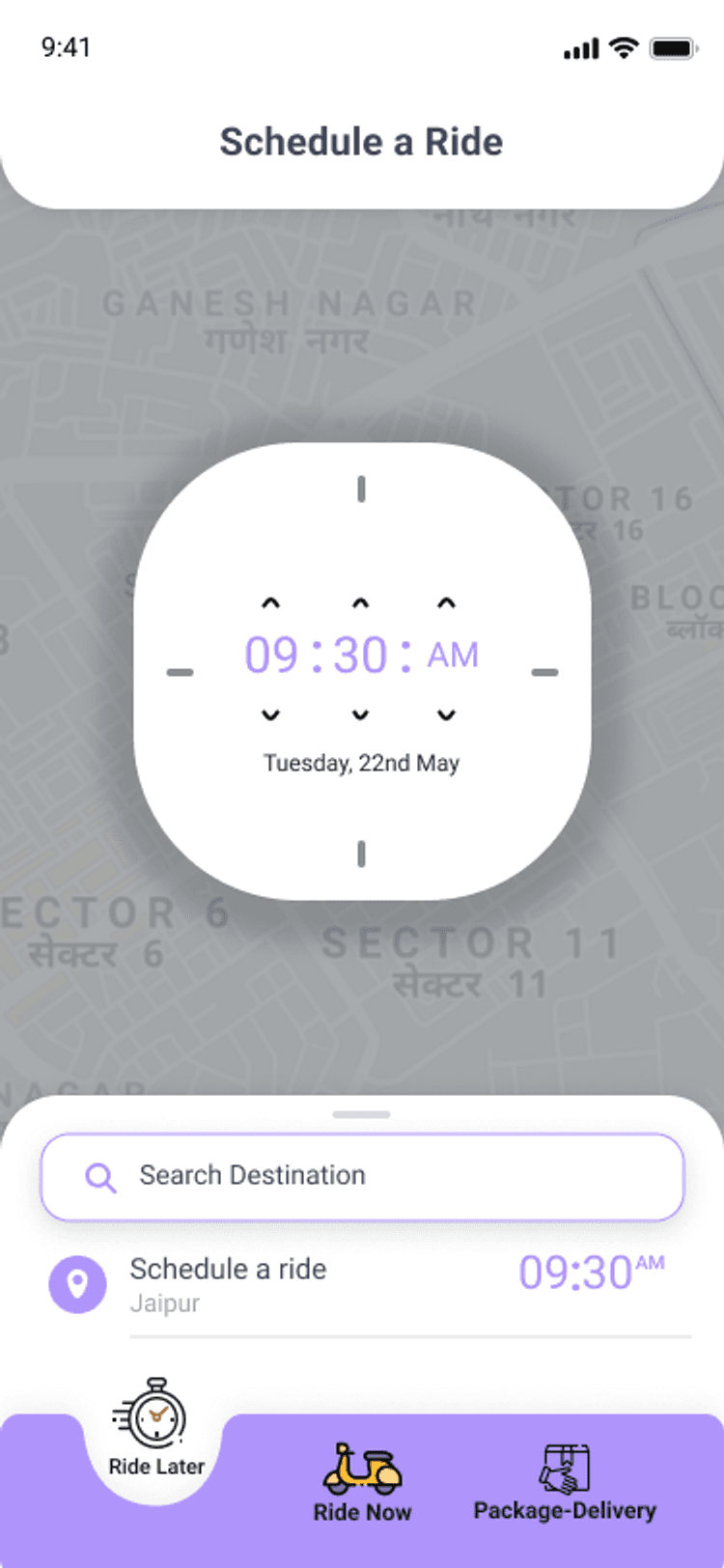
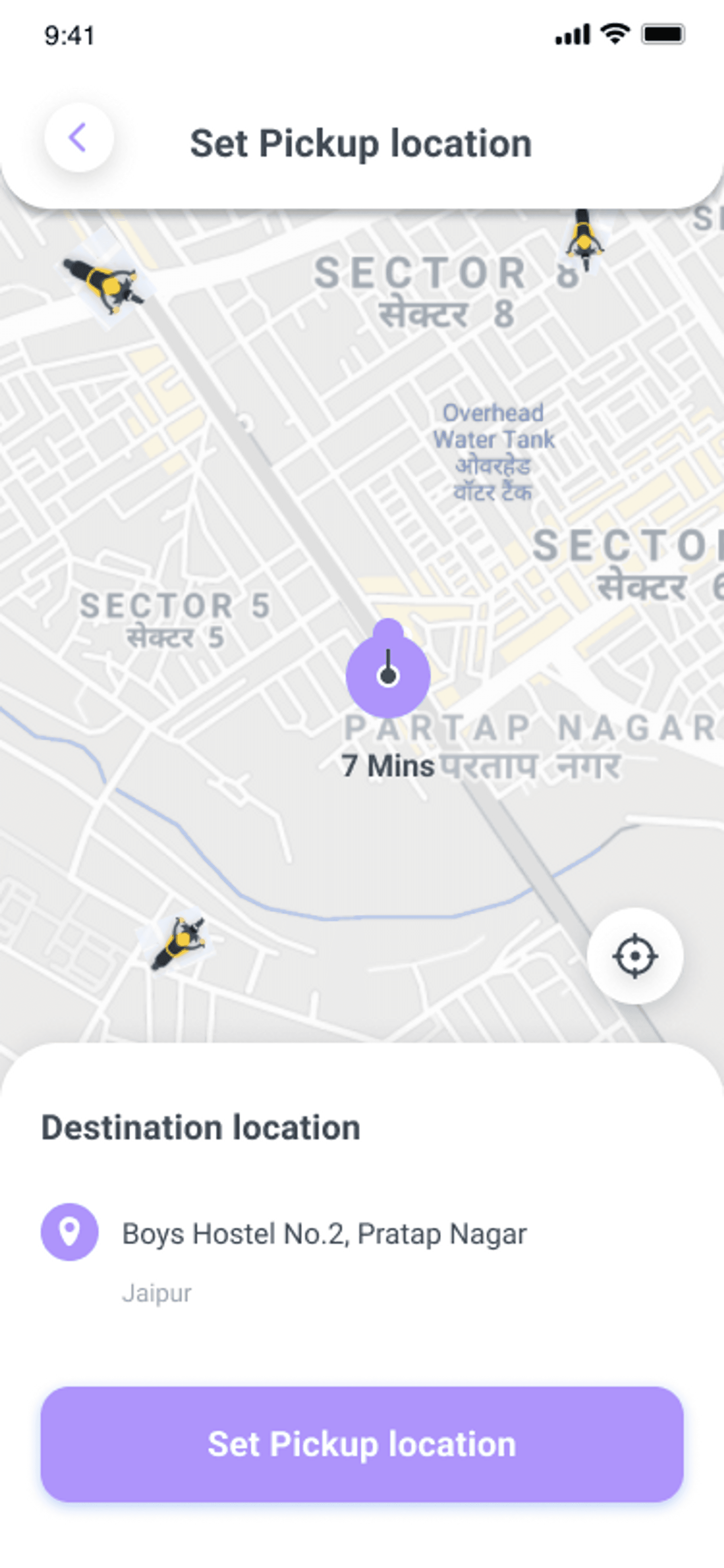
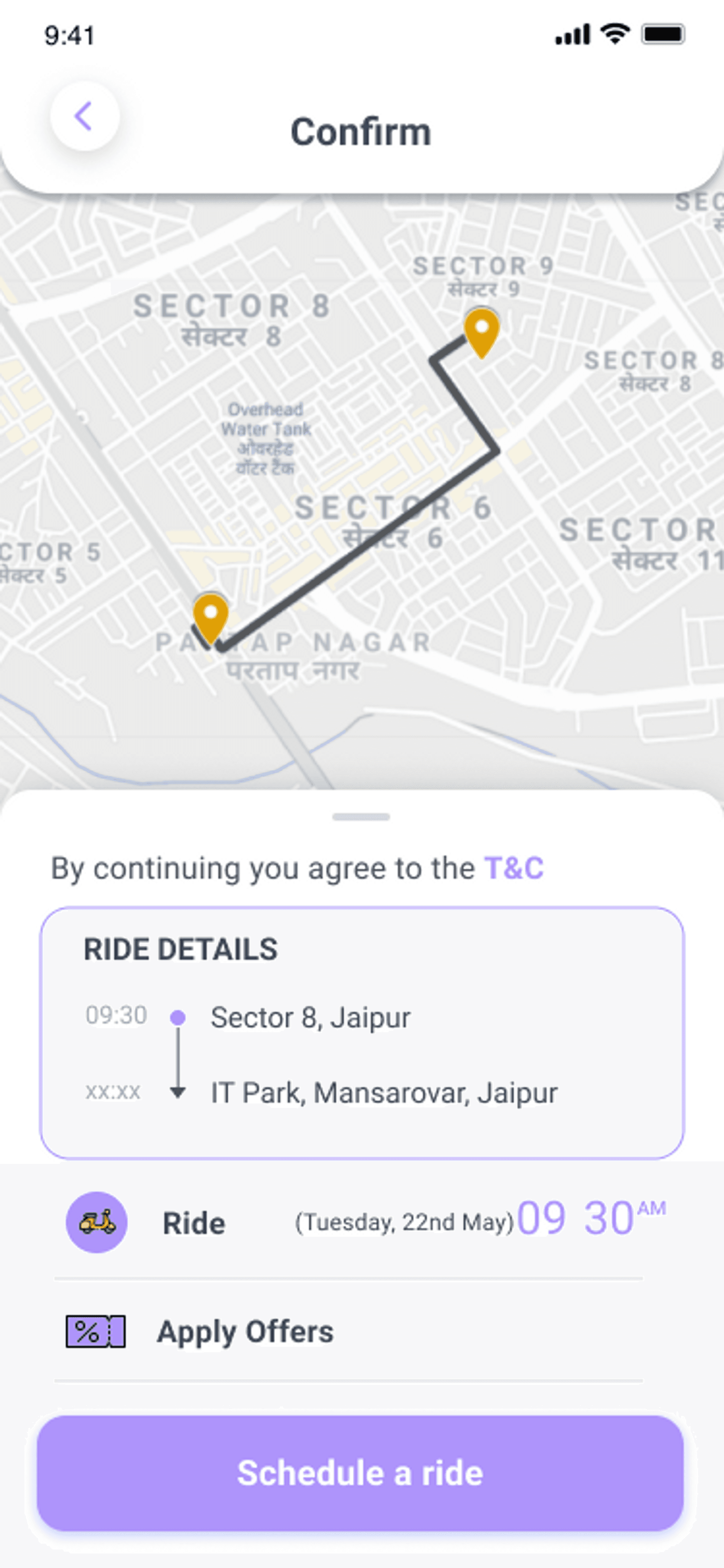
Moving onto the Ride Later APIs, which enable users to schedule a ride according to their preferred time and date.
As mentioned, user books a ride according to their preferred date and time, which on the driver’s end are visible with details of the trip if the scheduled trips are within their distance range, and they can either accept or reject the trip accordingly after which a Notification is sent to the user for the confirmation of the trip and Driver’s are notified a half hour before the scheduled time to go for the pickup.
Let’s start building this functionality
You can book a ride based on your preferred date and time by referring to the API below.
Controller Layer
@RequestMapping(value = "/schedule/ridelater", method = RequestMethod.POST)
public Map<String, Object> scheduleRideLater(@RequestBody ScheduleRide scheduleRide){
    Map<String, Object> returnMap = new HashMap<String, Object>();

    try {
    	ScheduleRide scheduleRideSaved = scheduleRideService.scheduleRideLater(scheduleRide);

    	if(scheduleRideSaved.getTripStatus().equals(Constant.TRIP_PENDING)) {
    		returnMap.put(Constant.MESSAGE, "Ride later request has been booked successfully");
    	}
    	else {
    		returnMap.put(Constant.MESSAGE, "Ride later request has been cancelled");
    	}

    	returnMap.put(Constant.STATUS, Status.success);
    	returnMap.put(Constant.DATA, scheduleRideSaved);
    }
    catch (Exception e) {
        logger.error(e.toString());
        returnMap.put(Constant.STATUS, Status.failed);
        returnMap.put(Constant.MESSAGE, e.getMessage());
    }
    return returnMap;
}
Service Implementation Layer
@Override
public ScheduleRide scheduleRideLater(ScheduleRide scheduleRide) throws ExecutionException, InterruptedException {

	ScheduleRide scheduleRideSaved;

	if(scheduleRide.getTripStatus().equals(Constant.TRIP_CANCELLED)) {
		Optional<ScheduleRide> scheduleRideDB = scheduleRideRepository.findById(scheduleRide.getScheduleId());
		if(scheduleRideDB.isPresent()) {
			scheduleRideDB.get().setTripStatus(Constant.TRIP_CANCELLED);
			scheduleRideSaved = scheduleRideRepository.save(scheduleRideDB.get());

			if(scheduleRideDB.get().getTripId() != null) {
				Trip trip = tripService.getTripDetailByTripId(scheduleRideDB.get().getTripId());
				trip.setTripStatus(Constant.TRIP_CANCELLED);
				Trip tripSaved = tripService.updateTrip(trip);
				System.out.println("Ride Later Captain, Request has been cancelled");
				pushNotificationService.sendPushNotificationToPartnerToken(tripSaved, "Ride Later", "Captain, Request has been cancelled");
			}
		}
		else {
			throw new ResourceNotFoundException("ScheduleRide", "scheduleId", scheduleRide.getScheduleId());
		}
	}
	else {
		scheduleRideSaved = scheduleRideRepository.save(scheduleRide);
	}

	return scheduleRideSaved;
}
To view nearby scheduled rides, we need an API that enables drivers to view them.
Controller Layer
@RequestMapping(value = "/schedule-rides/{driverLatitude}/{driverLongitude}", method = RequestMethod.GET)
public Map<String, Object> getListOfScheduleRides(@PathVariable("driverLatitude") Double driverLatitude, @PathVariable("driverLongitude") Double driverLongitude){
	Map<String, Object> returnMap = new HashMap<String, Object>();

	try {
		List<ScheduleRide> scheduleRides = scheduleRideService.getListOfScheduleRides(driverLatitude, driverLongitude);
		returnMap.put(Constant.DATA, scheduleRides);
		returnMap.put(Constant.STATUS, Status.success);
	}
	catch (Exception e) {
		logger.error(e.toString());
		returnMap.put(Constant.STATUS, Status.failed);
		returnMap.put(Constant.MESSAGE, e.getMessage());
	}

	return returnMap;
}
Service Implementation Layer
@Override
public List<ScheduleRide> getListOfScheduleRides(Double driverLatitude, Double driverLongitude) throws Exception {
	List<ScheduleRide> scheduleRides1 = scheduleRideRepository.getListOfScheduleRides(driverLatitude, driverLongitude, 5);
	List<ScheduleRide> scheduleRides2 = scheduleRideRepository.getListOfScheduleRides(driverLatitude, driverLongitude, 7);
	List<ScheduleRide> scheduleRides3 = scheduleRideRepository.getListOfScheduleRides(driverLatitude, driverLongitude, 9);
	List<ScheduleRide> scheduleRides4 = scheduleRideRepository.getListOfScheduleRides(driverLatitude, driverLongitude, 11);

	if(!scheduleRides1.isEmpty()) {
		System.out.println("1");
		return scheduleRides1;
	}
	else if(!scheduleRides2.isEmpty()) {
		System.out.println("2");
		return scheduleRides2;
	}
	else if(!scheduleRides3.isEmpty()) {
		System.out.println("3");
		return scheduleRides3;
	}
	else if(!scheduleRides4.isEmpty()) {
		System.out.println("4");
		return scheduleRides2;
	}
	else {
		throw new Exception("No Trip Found");
	}
}
Lastly, we need an API for the driver, which updates the trip status and sends a notification half hour before the scheduled trip.
Controller Layer
@RequestMapping(value = "/assign/schedule/{scheduleId}/driver/{driverId}", method = RequestMethod.PUT)
public Map<String, Object> assignDriverToScheduleRide(@PathVariable(value = "scheduleId", required = true) Long scheduleId, @PathVariable(value = "driverId", required = true) Long driverId){
	Map<String, Object> returnMap = new HashMap<String, Object>();

	try {
		ScheduleRide scheduleRideSaved = scheduleRideService.findByScheduleId(scheduleId);

		if (scheduleRideSaved.getTripStatus().equals(Constant.TRIP_PENDING)) {
			Trip trip = scheduleRideService.assignDriverToScheduleRide(scheduleRideSaved, driverId);
			returnMap.put(Constant.DATA, trip);
			returnMap.put(Constant.STATUS, Status.success);
		}
		else if(scheduleRideSaved.getTripStatus().equals(Constant.TRIP_ACCEPTED)) {
			returnMap.put(Constant.MESSAGE, "Ride has been accepted by another driver already");
			returnMap.put(Constant.STATUS, Status.failed);
		}
		else {
			returnMap.put(Constant.MESSAGE, "Ride has been cancelled by "  + scheduleRideSaved.getUsername() );
			returnMap.put(Constant.STATUS, Status.failed);
		}
	}
	catch (Exception e) {
		logger.error(e.toString());
		returnMap.put(Constant.STATUS, Status.failed);
		returnMap.put(Constant.MESSAGE, e.getMessage());
	}

	return returnMap;
}
Service Implementation Layer
@Override
public Trip assignDriverToScheduleRide(ScheduleRide scheduleRideSaved, Long driverId) throws ExecutionException, InterruptedException {
	User user = userService.getUserDetailByUserId(driverId);

	scheduleRideSaved.setDriverId(driverId);
	scheduleRideSaved.setDriverUsername(user.getUsername());
	scheduleRideSaved.setTripStatus(Constant.TRIP_ACCEPTED);
	Trip trip = modelMapper.map(scheduleRideSaved, Trip.class);
	Trip tripSaved = tripService.saveTrip(trip);
	scheduleRideSaved.setTripId(trip.getTripId());
	scheduleRideRepository.save(scheduleRideSaved);


	CompletableFuture.runAsync(() -> {
		try {
			pushNotificationService.sendSchedulePushNotificationToPartnerToken(tripSaved);
		} catch (ParseException e) {
			e.printStackTrace();
		}
	});

	pushNotificationService.sendPushNotificationToUserToken(trip, "Ride Later", "Your ride has been accepted by " + user.getUsername());
	System.out.println("hello");
	return tripSaved;
}
Repository Layer
Below is a query that retrieves nearby scheduled rides based on the driver's latitude and longitude.
@Repository
public interface ScheduleRideRepository extends JpaRepository<ScheduleRide, Long>{

    @Query(
            value = "SELECT *, ((ACOS(SIN(?1 * PI() / 180) * SIN(SOURCE_LATITUDE* PI() / 180) + COS(?1* PI() / 180) * COS(SOURCE_LATITUDE* PI() / 180) * COS((?2- SOURCE_LONGITUDE) * PI() / 180)) * 180 / PI()) * 60 * 1.1515* 1.609344) AS DISTANCE FROM SCHEDULE_RIDE WHERE TRIP_STATUS='TRIP_PENDING' GROUP BY SCHEDULE_ID HAVING DISTANCE <=?3 ORDER BY DISTANCE ASC LIMIT 0,10",
            nativeQuery = true
    )
	public List<ScheduleRide> getListOfScheduleRides(Double driverLatitude, Double driverLongitude, int distance);

}
Payment-Gateway
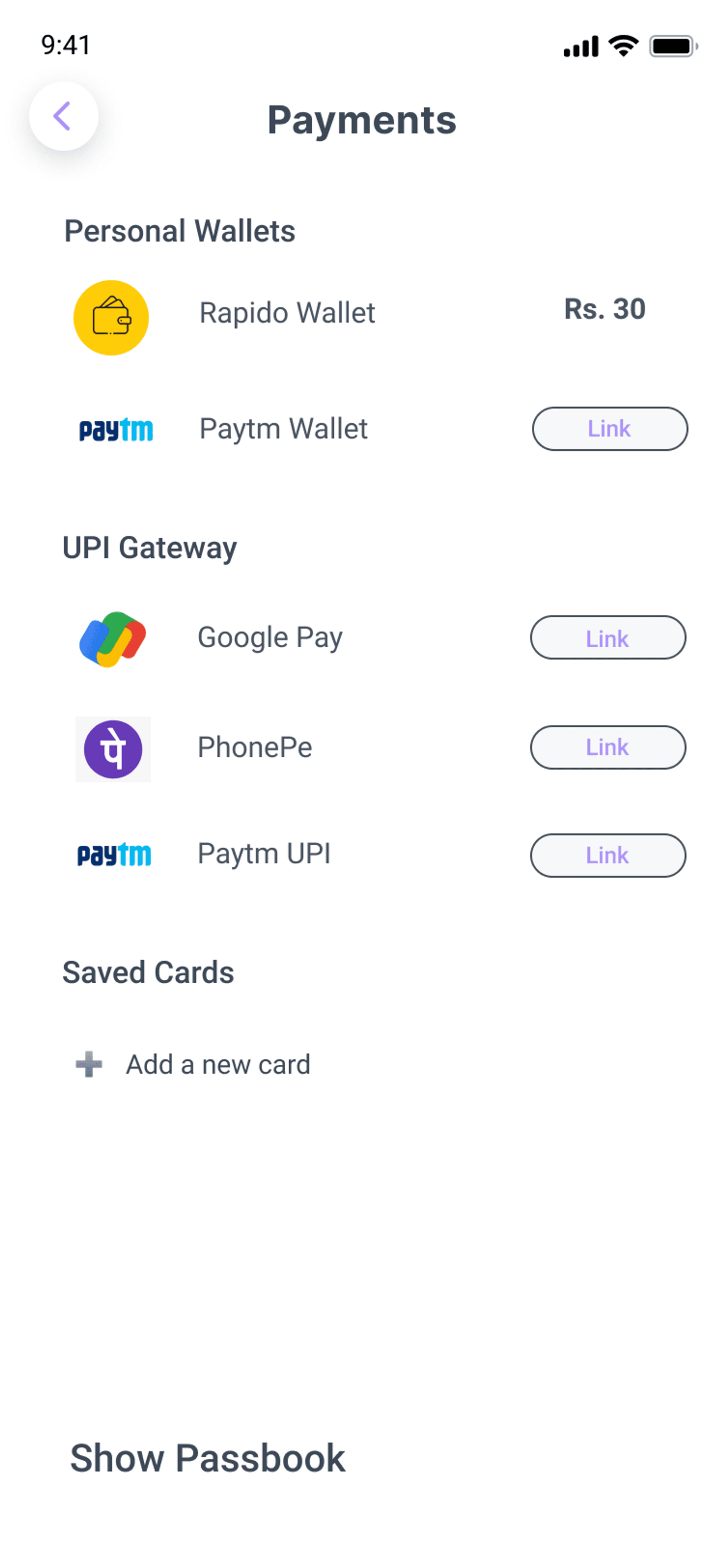
Razorpay payment gateway is integrated at the backend and frontend via its SDK which allows users to make an online payment after the trip.
Once the trip is completed the user is directed to the Razorpay payment screen.
Add the following code in razorpay_screen.dart
Consumer(
                builder: (BuildContext context, WidgetRef ref, Widget? child) {
                  ref.listen(razorpayProvider, (previous, state) {
                    if (state is PaymentLoadingState) {
                      // loading

                      const CircularProgressIndicator();
                    }
                    if (state is PaymentSuccessState) {
                      final orderDetails = state.response;

                      var options = {
                        'key': kRazorpayKey,
                        'amount': orderDetails.amount,
                        'name': 'Ridde App',
                        'order_id': orderDetails.orderId,
                        'description': 'Great! Your ride is completed.',
                        'timeout': 200, // in seconds
                        'prefill': {
                          'contact': '7057773443',
                          'email': 'test123@gmail.com'
                        }
                      };

                      try {
                        _razorpay.open(options);
                      } catch (e) {
                        print("Razorpay error" + e.toString());
                      }
                    }
                  });

                  return RiddeCustomElevatedButton(
                    label: "Pay Now",
                    onPressed: () {
                      double amount = double.parse(widget.trip!.farePrice);

                      _getOrderId(ref: ref, amount: amount);
                    },
                    width: 150,
                    color: Theme.of(context).colorScheme.primary,
                  );
                },
Now to create a new order for payment, follow the given code:
_getOrderId({required WidgetRef ref, required double amount}) {
    String username = ref.read(hivePrefProvider).getUsername();
    int userId = ref.read(hivePrefProvider).getUserId();

    if (amount != 0.0 && username.isNotEmpty) {
      ref.read(razorpayProvider.notifier).createOrder(
            amount: amount,
            username: username,
            userId: userId,
          );
    } else {
      ScaffoldMessenger.of(context).showSnackBar(
        SnackBar(
          content: Text(
            tr('empty_username_pwd'),
          ),
        ),
      );
    }
  }
Add the following code in razorpay_payment_state.dart
 Future<void> createOrder(
      {required double amount,
      required String username,
      required int userId}) async {
    state = PaymentLoadingState();
    final razorpayOrder = await _razorpayRepository.createOrder(
        amount: amount, username: username, userId: userId);
    razorpayOrder.fold((l) {
      state = PaymentErrorState(error: l.message);
    }, (r) {
      state = PaymentSuccessState(response: r);
    });
  }
Future<Either<AppError, OrderResponse>> createOrder({
required double amount,
required int userId,
required String username,
}) async {
try {
Response response = await _dio.post('/payment/create/order', data: {
"amount": amount,
"userId": userId,
"username": username,
});
OrderResponse orderResponse = OrderResponse.fromJson(response.data);
if (orderResponse.orderId.isNotEmpty) {
return Right(orderResponse);
}
return Left(
AppError(appErrorType: AppErrorType.unauthorised, message: 'Error'),
);
} on DioError catch (e) {
_logger.e(e.toString());
return Left(
AppError(
appErrorType: AppErrorType.network,
message: tr('network_error'),
),
);
} on Exception catch (e) {
_logger.e(e.toString());
return Left(
AppError(
appErrorType: AppErrorType.api,
message: tr('unknown_error'),
),
);
}
}Now let's understand the backend part of Razorpay payment
- Payment to Ridde Company
For payment to the company, 2 APIs, Order Creation and Update Order are created which can be referred from Razorpay docs.
[<https://razorpay.com/docs/payments/server-integration/java/payment-gateway/build-integration/>](<https://razorpay.com/docs/payments/server-integration/java/payment-gateway/build-integration/>)
- The Order Creation API requests for amount, currency and receipt to create an order and returns order details containing order_id, which is passed to the checkout page for payment completion.
@Override
public PaymentDetails createOrder(Map<String, Object> data) throws RazorpayException {

	User user = userService.getUserDetailByUserName(data.get("username").toString());

	if(user == null) {
		throw new ResourceNotFoundException("User", "userId : " + data.get("userId").toString() + " and username", data.get("username").toString());
	}

	System.out.println(data);
	Double amt = Double.parseDouble(data.get("amount").toString());
	RazorpayClient razorpayClient = new RazorpayClient("rzp_test_oMk7FxDzrPXD4m", "K0w1fn3wNgXYlRSjkL7yJl3G");

	JSONObject orderRequest = new JSONObject();
	orderRequest.put("amount", amt * 100);
	orderRequest.put("currency", "INR");
	orderRequest.put("receipt", UUID.randomUUID().toString());

	Order order = razorpayClient.orders.create(orderRequest);
	System.out.println(order);

	PaymentDetails payment = new PaymentDetails();

	payment.setOrderId(order.get("id"));
	payment.setEntity(order.get("entity"));
	payment.setAmount((Double.parseDouble(order.get("amount").toString())) / 100);
	payment.setAmount_paid((Double.parseDouble(order.get("amount_paid").toString())) / 100);
	payment.setAmount_due((Double.parseDouble(order.get("amount_due").toString())) / 100);
	payment.setCurrency(order.get("currency"));
	payment.setReceipt(order.get("receipt"));
	payment.setStatus(order.get("status"));
	payment.setAttempts(order.get("attempts"));
	payment.setCreated_at(order.get("created_at"));
	Long userId = Long.parseLong(data.get("userId").toString());
	payment.setUserId(userId);
	payment.setUsername(data.get("username").toString());

	PaymentDetails paymentSaved = paymentDetailsRepository.save(payment);

	return paymentSaved;
}
The Update Order API requests for razorpay_order_id, razorpay_signature, razorpay_payment_id and payment_status to update the order status and verify the razorpay_signature.
@Override
public PaymentDetails updateOrder(Map<String, Object> data) throws SignatureException {
	Optional<PaymentDetails> payment = paymentDetailsRepository.findByOrderId(data.get("razorpay_order_id").toString());

	if (payment.isPresent()) {
		payment.get().setPaymentId(data.get("razorpay_payment_id").toString());
		payment.get().setStatus(data.get("payment_status").toString());
	} else {
		throw new ResourceNotFoundException("Order", "razorpay_order_id" , data.get("razorpay_order_id"));
	}

	String razSign = data.get("razorpay_signature").toString();
	String genSign = RazorpaySignature.calculateRFC2104HMAC(payment.get().getOrderId() + "|" + payment.get().getPaymentId(), "K0w1fn3wNgXYlRSjkL7yJl3G");

	PaymentDetails paymentSaved;
	if (razSign.equals(genSign)) {
		payment.get().setAmount_paid(payment.get().getAmount_due());
		payment.get().setAmount_due(0.0);
		payment.get().setUpdate_at(new Date());
		paymentSaved = paymentDetailsRepository.save(payment.get());
	} else {
		throw new ResourceNotFoundException("Order", "razorpay_signature" , "invalid signature");
	}

	return paymentSaved;
}- Payment withdrawal for drivers
- Drivers can withdraw their cumulative trip money by creating their
Fund Accountand process it throughPayout - While registering with the application, Driver’s
contact accountis created on the RazorpayX dashboard, having contact_id which is stored in the user model. - With the contact_id, the Fund Account creation API can be triggered along with details like
account_type,name,IFSC,account_number, which in response providesfund_account_idwhich is used for Payout API.
- Drivers can withdraw their cumulative trip money by creating their
Contact Account
@Override
public PaymentContact createContact(Map<String, Object> data) {

	String url = "https://api.razorpay.com/v1/contacts";

	HttpHeaders header = new HttpHeaders();
	header.setBasicAuth("rzp_test_oMk7FxDzrPXD4m", "K0w1fn3wNgXYlRSjkL7yJl3G");

	HttpEntity<Object> httpEntity = new HttpEntity<>(data, header);
	System.out.println(httpEntity);
	String object = restTemplate.exchange(url, HttpMethod.POST, httpEntity, String.class).getBody();

	JSONObject contact = new JSONObject(object);
	System.out.println(contact);
	PaymentContact paymentContact = new PaymentContact();
	paymentContact.setContactId(contact.getString("id"));
	paymentContact.setEntity(contact.getString("entity"));
	paymentContact.setName(contact.getString("name"));
	paymentContact.setContact(contact.get("contact") == null ? null : contact.get("contact").toString());
	paymentContact.setEmail(contact.get("email") == null ? null : contact.get("email").toString());
	paymentContact.setType(contact.getString("type"));
	paymentContact.setReference_id(contact.getString("reference_id"));
	paymentContact.setBatch_id(contact.get("batch_id") == null ? null : contact.get("batch_id").toString());
	paymentContact.setActive((boolean) contact.get("active"));
	paymentContact.setNotes(contact.get("notes").toString());

	long unixSeconds = Long.parseLong(contact.get("created_at").toString());
	Date date = new Date(unixSeconds * 1000L);

	paymentContact.setCreated_at(date);

	PaymentContact paymentContactSaved = paymentContactRepository.save(paymentContact);

	System.out.println(paymentContactSaved);

	return paymentContactSaved;
}
Fund Account
@Override
public PaymentFundAccount createFundAccount(@RequestBody Map<String, Object> data) throws RazorpayException {
	RazorpayClient razorpayClient = new RazorpayClient("rzp_test_oMk7FxDzrPXD4m", "K0w1fn3wNgXYlRSjkL7yJl3G");

	JSONObject fundAccount = new JSONObject();
	fundAccount.put("contact_id", data.get("contact_id").toString());
	fundAccount.put("account_type", data.get("account_type").toString());

	JSONObject bank_account = new JSONObject();
	bank_account.put("name", data.get("name").toString());
	bank_account.put("ifsc", data.get("ifsc").toString());
	bank_account.put("account_number", data.get("account_number").toString());

	fundAccount.put("bank_account", bank_account);

	FundAccount fundAccountCreated = razorpayClient.fundAccount.create(fundAccount);
	System.out.println(fundAccountCreated);

	PaymentFundAccount paymentFundAccount = new PaymentFundAccount();
	paymentFundAccount.setAccount_type(fundAccountCreated.get("account_type").toString());
	paymentFundAccount.setBatch_id(fundAccountCreated.get("batch_id") == null ? null : fundAccountCreated.get("batch_id").toString());
	paymentFundAccount.setActive(fundAccountCreated.get("active"));
	System.out.println(fundAccountCreated.get("created_at").toString());
	paymentFundAccount.setCreated_at(fundAccountCreated.get("created_at"));
	paymentFundAccount.setFund_account_id(fundAccountCreated.get("id").toString());
	paymentFundAccount.setContact_id(fundAccountCreated.get("contact_id").toString());
	paymentFundAccount.setEntity(fundAccountCreated.get("entity").toString());

	JSONObject bank_account_details = new JSONObject(fundAccountCreated.get("bank_account").toString());
	paymentFundAccount.setAccount_number(bank_account_details.getString("account_number"));
	paymentFundAccount.setNotes(bank_account_details.get("notes").toString());
	paymentFundAccount.setBank_name(bank_account_details.getString("bank_name").toString());
	paymentFundAccount.setName(bank_account_details.getString("name"));
	paymentFundAccount.setIfsc(bank_account_details.getString("ifsc"));

	PaymentFundAccount paymentFundAccountSaved = paymentFundAccountRepository.save(paymentFundAccount);

	return paymentFundAccountSaved;
}
Payout
@Override
public PaymentPayout createPayout(Map<String, Object> data) {

	String url = "https://api.razorpay.com/v1/payouts";

	System.out.println(Double.parseDouble(data.get("amount").toString()) * 100);

	Double amt = Double.parseDouble(data.get("amount").toString()) * 100;
	Integer value = amt.intValue();

	System.out.println(value);
	data.put("amount", value);

	HttpHeaders header = new HttpHeaders();
	header.setBasicAuth("rzp_test_oMk7FxDzrPXD4m", "K0w1fn3wNgXYlRSjkL7yJl3G");

	HttpEntity<Object> httpEntity = new HttpEntity<Object>(data, header);
	System.out.println(httpEntity);

	String object = restTemplate.exchange(url, HttpMethod.POST, httpEntity, String.class).getBody();
	System.out.println(object);

	JSONObject payout = new JSONObject(object);
	System.out.println(payout);

	PaymentPayout paymentTransfer = new PaymentPayout();
	paymentTransfer.setPaymentId(payout.get("id").toString());
	paymentTransfer.setEntity(payout.get("entity").toString());
	paymentTransfer.setFund_account_id(payout.get("fund_account_id").toString());
	paymentTransfer.setAmount(Double.parseDouble(payout.get("amount").toString()) / 100);
	paymentTransfer.setCurrency(payout.get("currency").toString());
	paymentTransfer.setNotes(payout.get("notes").toString());
	paymentTransfer.setFees(payout.getInt("fees"));
	paymentTransfer.setTax(payout.getInt("tax"));
	paymentTransfer.setStatus(payout.get("status").toString());
	paymentTransfer.setUtr(payout.get("utr").toString());
	paymentTransfer.setMode(payout.get("mode").toString());
	paymentTransfer.setPurpose(payout.get("purpose").toString());
	paymentTransfer.setReference_id(payout.get("reference_id").toString());
	paymentTransfer.setNarration(payout.get("narration").toString());
	paymentTransfer.setBatch_id(payout.get("batch_id").toString());

	JSONObject status_details = new JSONObject(payout.get("status_details").toString());
	paymentTransfer.setDescription(status_details.get("description").toString());
	paymentTransfer.setSource(status_details.get("source").toString());
	paymentTransfer.setReason(status_details.get("reason").toString());

	long unixSeconds = Long.parseLong(payout.get("created_at").toString());
	Date date = new Date(unixSeconds);

	paymentTransfer.setCreated_at(date);

	PaymentPayout paymentTransferSaved = paymentTransferRepository.save(paymentTransfer);

	return paymentTransferSaved;
}
Conclusion
Congratulations for making it till the end of the article.
To clone the project
- For the backend code, visit the link.
- Either download as zip file or clone it into your local computer.
- By using any of the IDE like IntelliJ IDEA, Eclipse or NetBeans etc you can simply run the project, or if maven is installed in your local system, then go to project folder and run command
mvn spring-boot:run
Future Updates
- Performance improvement
- Reward point system
- One on One Chats
Cheers! Now you have got proficiency in the topics of Web Sockets and Firebase Cloud Messaging, which are core aspects for building our Ridde Application.
My overall experience working with this application was really great as it opened new avenues of experimentation.
I would recommend you guys check it out and build your own apps! Thank you 😃
