
Building digital platforms today isn’t just about features or UI polish. Anyone can add sign-up forms, payment gateways, or a profile page. The real challenge comes when you scale: How do you make sure all your systems, onboarding, subscriptions, payments, CRM, analytics, and support stay in sync without chaos?
The invisible backbone is workflow automation, the machinery that ensures every system stays in sync, every transaction is reliable, and every user journey feels seamless. And now, with the rise of AI, automation is no longer just about consistency. It’s about intelligence.
The Growing Complexity of Digital Platforms
Every modern platform ends up connecting with a wide range of systems:
- Authentication and access management
- Payment gateways and subscription billing
- CRMs for customer data
- Databases and spreadsheets for operations
- Email and notification services
- Analytics and reporting
Each is useful in isolation, but together they create a messy web. Without automation, teams resort to manual syncs, spreadsheets, and custom scripts that eventually break. At 100 users, you might manage. At 10,000 users, this becomes a bottleneck.
Why Automation Matters
When we think about product development, most of the energy goes into building features: the UI, the payment flow, the content library, the recommendation engine. But features are only half the story.
The other half — often invisible to users — is the machinery that keeps everything connected and consistent. This machinery is automated. It is the backbone of any modern product.
1. The Backbone of Scale
A product without automation may work fine in the early days. But as soon as user numbers, transactions, and integrations grow, the cracks show:
- Users get duplicate accounts because onboarding isn’t consistent.
- Subscriptions don’t expire on time, leading to revenue leakage.
- Data doesn’t sync across tools, so analytics can’t be trusted.
Automation ensures that your product can scale beyond “startup hacks.” It applies rules consistently, keeps systems in sync, and prevents chaos as you grow.
2. The Safety Net in Urgent Situations
Automation isn’t just about efficiency when things are smooth. It’s about resilience when things go wrong.
Imagine these scenarios:
- A payment gateway goes down during peak hours. An automated retry workflow ensures transactions are re-attempted, preventing revenue loss.
- A contract expires, but instead of cutting access immediately, an automated grace-period flow sends emails and coupons, saving a customer relationship.
- An urgent security patch requires revoking access for specific users. An automated workflow ensures it happens instantly, across all integrated systems.
In urgent situations, automation acts as your safety net — responding in seconds, not hours, when human intervention would be too slow.
3. The Glue for User Experience
Users don’t see your internal systems. They only see the experience. When automation is absent, the gaps show up in frustrating ways:
- “Why did I get charged but not upgraded?”
- “Why am I still locked out even after renewing?”
- “Why is my profile incomplete when I signed up through Google?”
With automation, these cracks disappear. Every event — a signup, a payment, an expiry — triggers the right downstream workflows instantly. To the user, the platform feels seamless.
4. The Enabler of Focus
Finally, automation isn’t just about users; it’s about teams. Without it, teams spend hours reconciling spreadsheets, chasing expired contracts, or fixing data mismatches. With it, they can focus on building features, talking to customers, and improving the product.
In other words:
Automation is not just a cost saver. It’s a growth enabler.
Why n8n?
There are many automation tools: Zapier, Make, Temporal, and custom scripts. But n8n stands out for building production-grade workflows:
- Open-source & self-hostable → You own your automation infra, control security, avoid lock-in.
- Rich integrations → Hundreds of pre-built connectors with SaaS apps, APIs, and databases.
- Flexibility → From simple if-this-then-that flows to multi-branch orchestrations with error handling and retries.
- Developer + business friendly → Visual UI for non-engineers, code nodes for engineers.
- Scalable architecture → Docker/Kubernetes-ready for enterprise adoption.
In short: n8n is more than a tool. It’s the automation backbone for platforms at scale.
Case Study: User Sync Across Systems with Automated Emails
One of the most common challenges in scaling platforms is when users exist in multiple systems but aren’t synchronized. For example:
- A user signs up for the community platform.
- Their subscription data is in Stripe.
- Their profile lives in Airtable.
- Their access rights are in a third-party system like VendHub.
Without automation, you’d need manual reconciliation — exports, imports, and constant checking. But that’s slow, error-prone, and breaks at scale.
The Automated Solution
Using n8n, we built a workflow that did the following:
- Trigger on User Event
Any signup, update, or contract change (from Stripe, the app, or CRM) triggers the workflow. - Fetch User Records Across Systems
The workflow queries Airtable, VendHub, and the internal database.
Data is normalized (for example, email is the unique identifier). - Check Contract Information
If the contract is active → keep the user synced across all systems.
If the contract has expired → mark as expired, revoke access, and prepare communication.
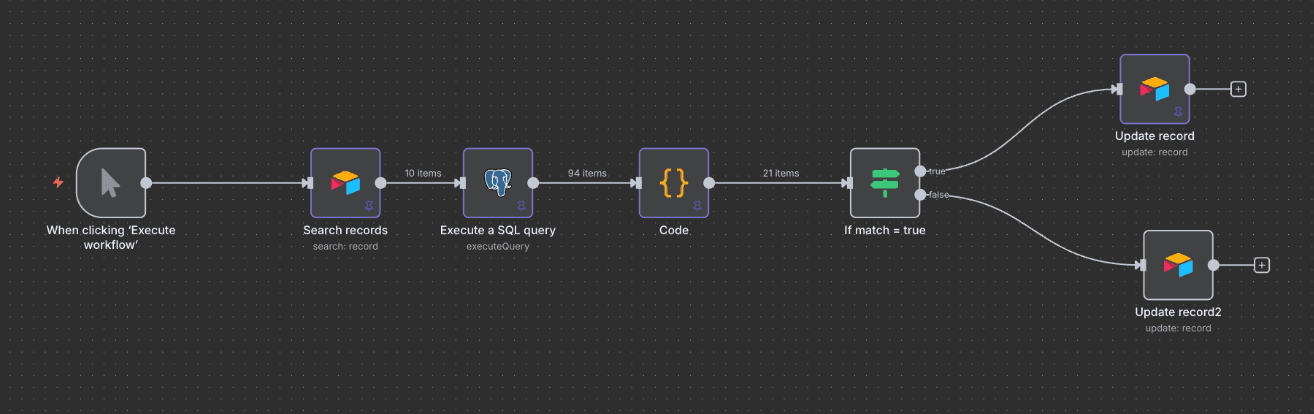
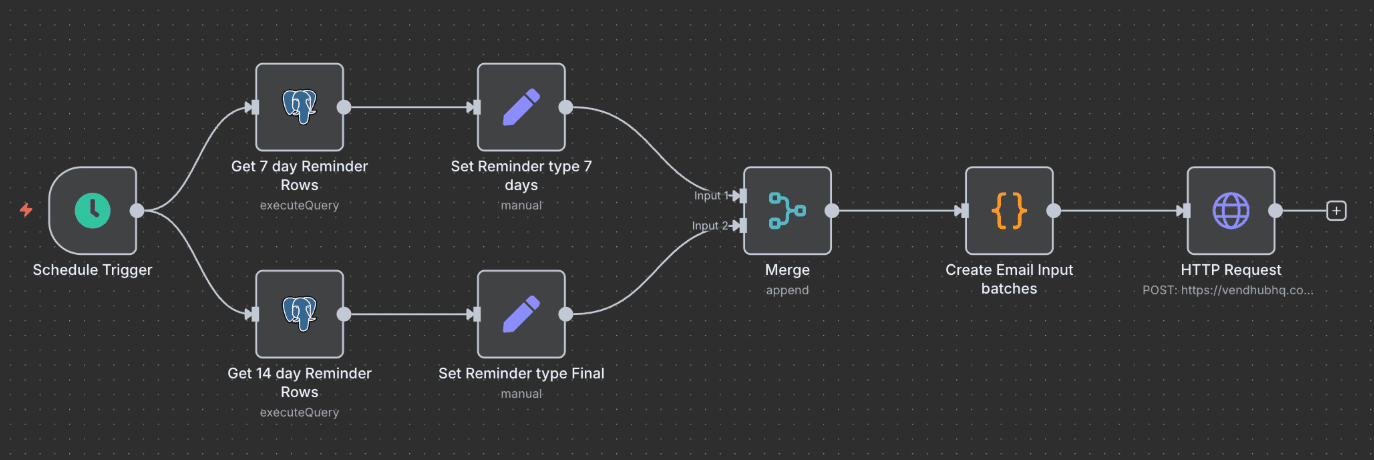
- Send Automated Email
If expired, send a personalized email notifying the user.
Include a 14-day trial offer and a unique coupon code to reactivate.
- Update Master Dataset
All states (active, expired, reactivated) are written back to Airtable.
This ensures a single source of truth for analytics and operations.
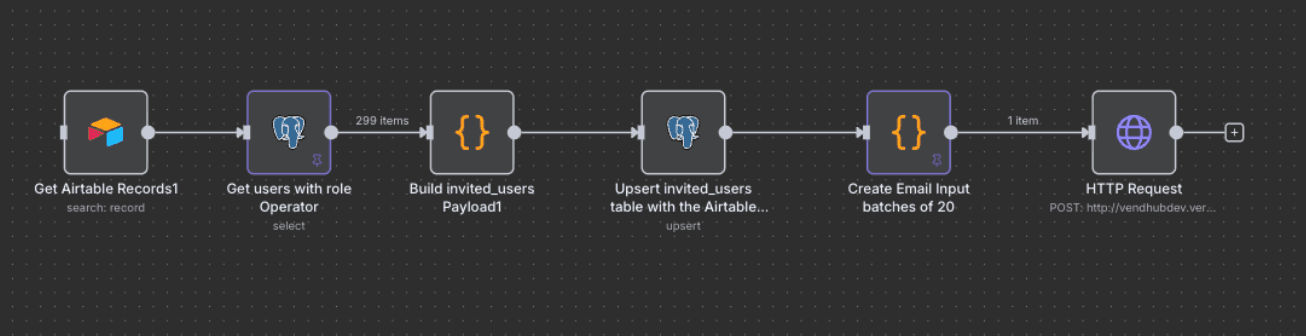
Example Workflow
Here’s a simplified lifecycle automation flow:
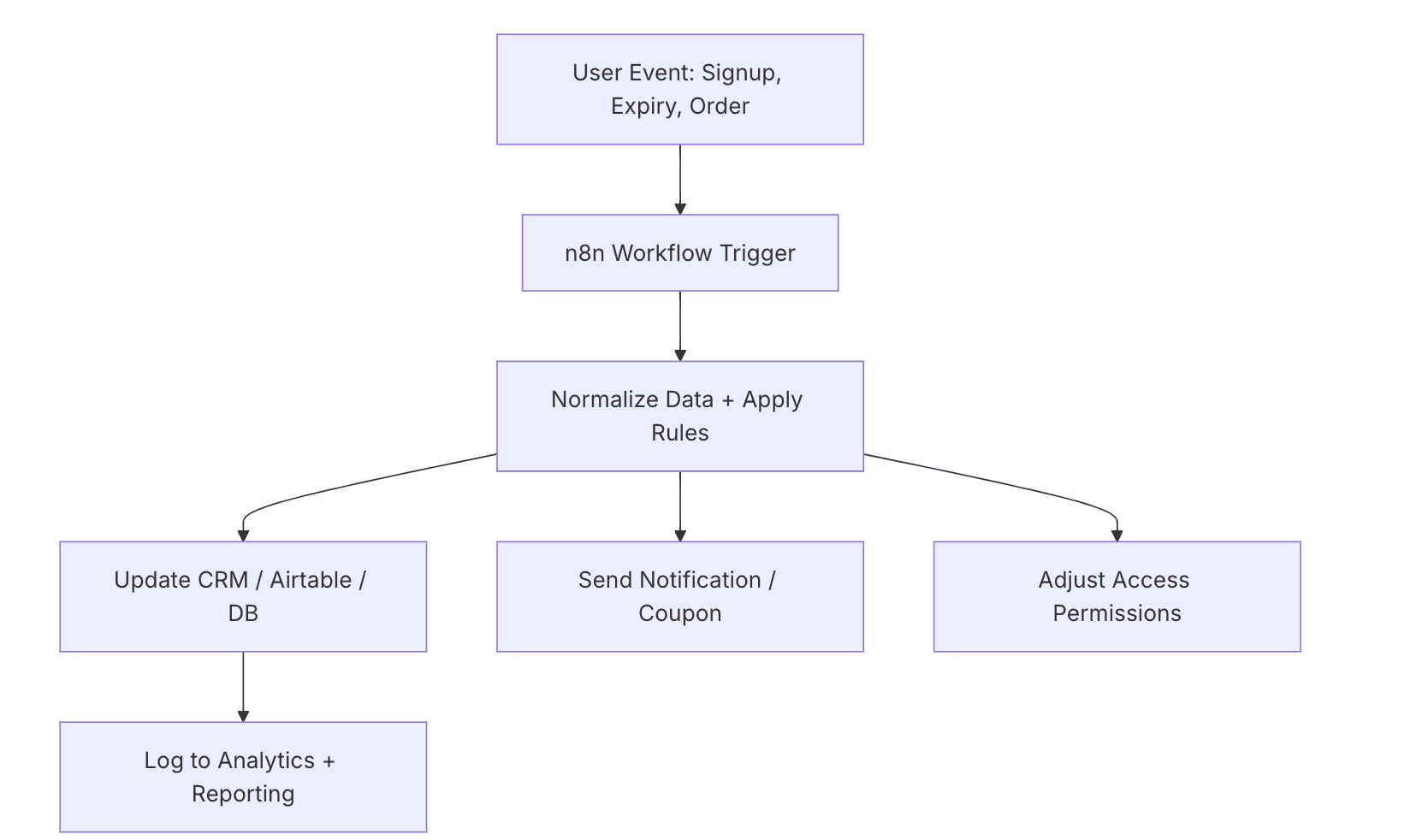
Even a simple automation like this can eliminate hours of manual work and ensure a consistent user experience.
The Impact of an Automation Backbone
AI elevates automation from being rule-based to becoming adaptive and intelligent. Instead of rigid “if-this-then-that” workflows, platforms gain the ability to make context-aware decisions — deciding which users should get a discount versus a survey, detecting anomalies in transactions before they escalate, cleaning and enriching messy data across systems, and even generating personalized communications that feel human rather than robotic. The result is not just operational efficiency, but a platform that is resilient under stress, proactive in preventing failures, and capable of delivering experiences that scale with intelligence rather than brute force. In short, automation gives consistency; AI makes it smart.
When workflow automation becomes part of your architecture, the results are transformative:
- Teams gain efficiency → No more manual sync firefighting.
- Rules are enforced reliably → No more ad hoc decisions.
- Scale doesn’t hurt → More users don’t mean more chaos.
- Users stay happy → Seamless, consistent experiences win loyalty.
Looking Ahead
We are entering a future where automation+AI layers become invisible infrastructure. Instead of cobbling systems together with patches and scripts, platforms will run on orchestrators that quietly handle:
- Compliance rules
- Retention campaigns
- Data normalization
- Personalization flows
Tools like n8n, with AI-powered extensions, are leading the way by being both accessible and powerful enough for production.
Final Thoughts
Automation isn’t about replacing humans — it’s about removing the chaos that slows them down.
The truth is simple:
Features get you started. Automation makes you scale.
Today, in an era where products are built and shipped faster than ever, the real challenge isn’t speed — it’s stability. Moving fast without a strong backbone leads to chaos: fragmented data, broken user journeys, and endless manual fixes. This is where automation, powered by AI, becomes essential. Automation brings the structure and reliability needed to scale with confidence, while AI adds the intelligence to adapt in real time. Together, they create platforms that don’t just move fast, but move fast without breaking — resilient, seamless, and ready for growth.