

My name is Szymon Rybczak, and I am a React Native developer at Callstack. On a daily basis, I work in a tech team where I support research and development initiatives. I’m also involved in maintaining the React Native Community CLI and other libraries. You can find me on GitHub and Twitter under my handle, where I often share what we’re working on at Callstack.
Bringing AI to React Native: The Game Changer
I will dive into a topic that’s on everyone’s mind these days: AI. But this isn’t going to be just another talk about integrating GPT calls. No, I want to take AI in React Native to a whole new level. My goal is to explore how we can make AI locally accessible within React Native apps, even without an internet connection. Sounds exciting, right? Let me explain how.
AI Everywhere: But Let’s Bring It Closer to Home
AI is everywhere. It’s almost impossible to have a conversation these days without hearing about the latest AI model that’s faster, cheaper, and better. From work chats to dinner conversations, AI is shaping the way we solve problems and interact with technology. But there’s one glaring issue: right now, most of AI runs in the cloud. And the cloud isn’t cheap—it involves servers, infrastructure, and constant connectivity.
Why Not Use the Power of Mobile Devices?
But what if we could tap into the incredible processing power of the devices we all carry in our pockets? Modern mobile devices have tremendous performance capabilities. Take the iPhone 15 Pro, for example. When benchmarked against the iPad Mini with an M2 chip, the iPhone actually outperforms the iPad in single-thread performance. This shows that the devices we use every day are more powerful than we realize.
The Browser Gets a Taste of Local AI: Enter Gemini Nano
Let’s talk about some recent breakthroughs. Chrome has introduced a feature called window.ai, which allows you to run an LLM (Large Language Model) called Gemini Nano locally within the browser. This version of Gemini, though smaller, performs incredibly well. It can do simple math, answer questions, and is available anytime without needing internet access. Imagine this: in the future, every browser might adopt this capability, making AI inside web apps a breeze—even when your internet connection isn’t the best.
Now, let’s bring it back to React Native and mobile apps. The question is: can we harness this power for mobile devices too? Who here uses React Native on a daily basis? Raise your hands! Alright, quite a few of you. So, when I started exploring how we could run models on mobile devices, I came across this fascinating project called MLC LLM.
MLC LLM: Bringing AI Models Everywhere
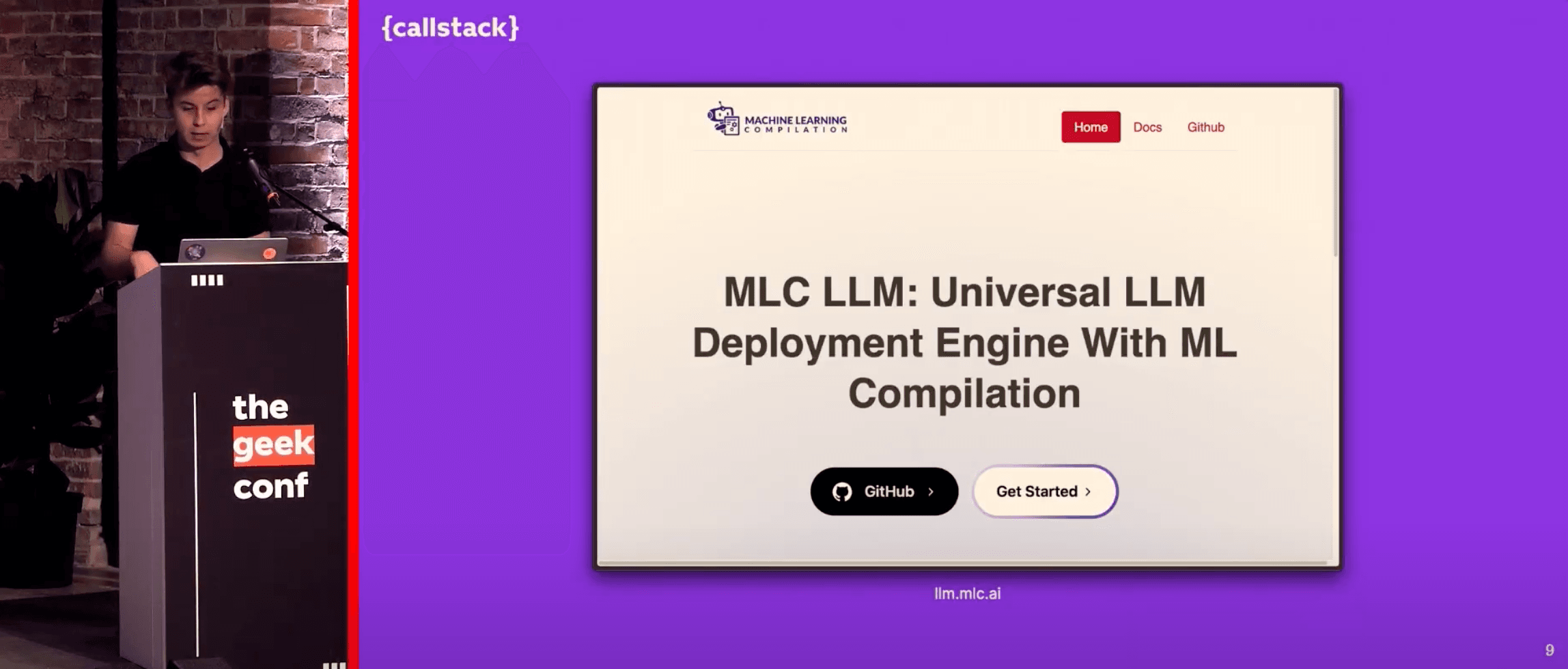
MLC LLM is a universal engine that allows us to deploy and run LLM models on any platform. So, how does it work? There are three key phases involved. First, we need to download the model from Hugging Face (think of it as the npm registry for AI models). Next, we compile the model into the right format using some Python scripts. And finally, we get the binaries, which can be easily linked to Android and iOS apps. From there, we can access the model directly in React Native.
Creating a Library for React Native
With this newfound power, I knew I had to create a library for React Native. At Callstack, we built a tool called Create React Native Library, which helps developers create React Native libraries with templates for Fabric, TurboModules, and more. Kudos to Satya and Burak for maintaining it! This tool will soon be the official method for creating React Native libraries as part of the Golden Library Initiative.
Making the JS API Simple and Powerful
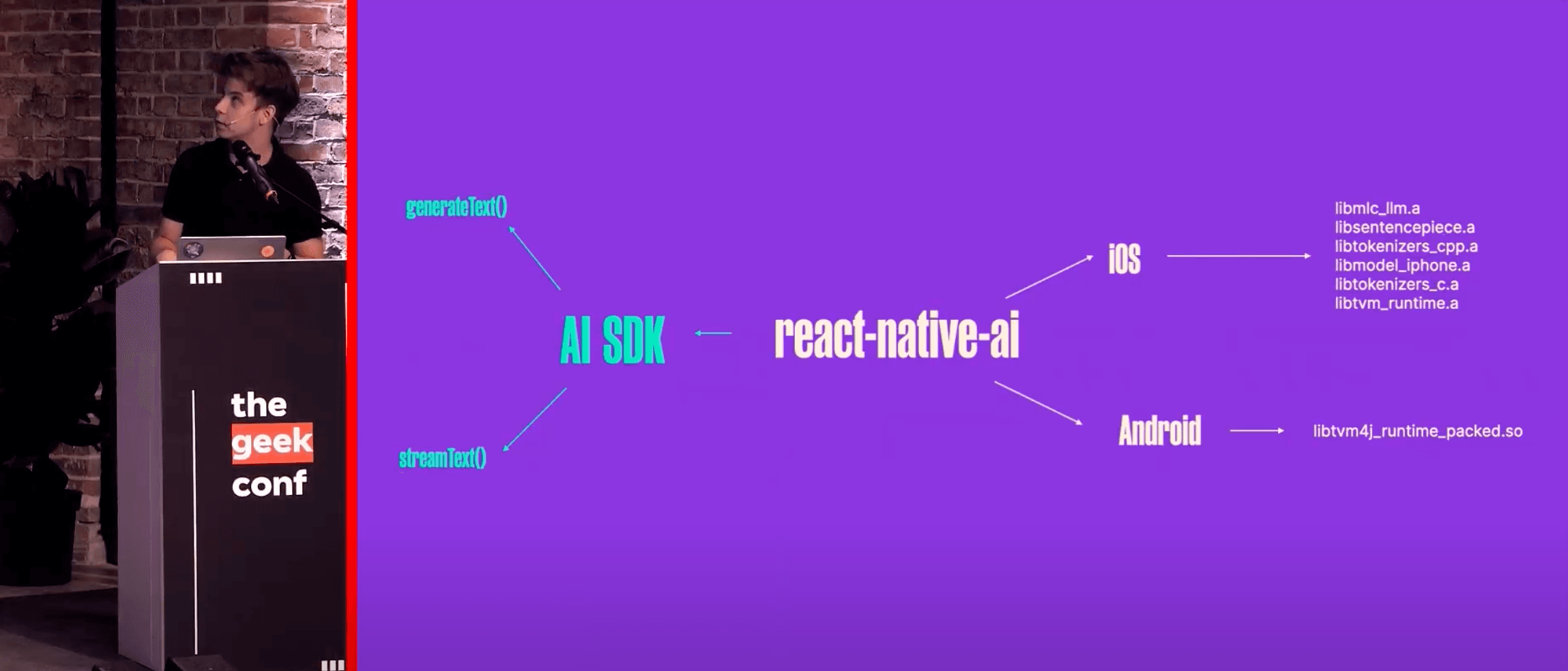
When I prototyped the project, I wanted a simple and intuitive JS API. I looked at how the Vercel AI SDK integrates with web apps and thought: this could work for React Native, too! All you need to do is import a method like generateText or streamText from the AI package, pass in your provider and prompt, and voilà—you’ve got AI-generated text.
The Magic of Providers in AI
One of the coolest things about this is the flexibility of providers. You can pass any provider you want—from Vercel’s own AI to a custom one. Or, you can use a provider from the React Native AI module that runs the model from the native runtime and exports it to JavaScript. This opens up endless possibilities for integrating AI locally in React Native apps.
Demo Time: Bringing It All Together
Alright, enough talk—let’s see this in action! I’m going to mirror my screen and show you how this all works in a React Native app. I’ve turned on airplane mode and disabled my internet connection, so we’re running fully offline. Now, let’s ask the model a simple question like, "What’s React Native?" The model processes the query, and—boom!—we have a locally generated response: "React Native is an open-source mobile application framework created by Facebook."
Under the Hood: The Tech That Makes It Happen
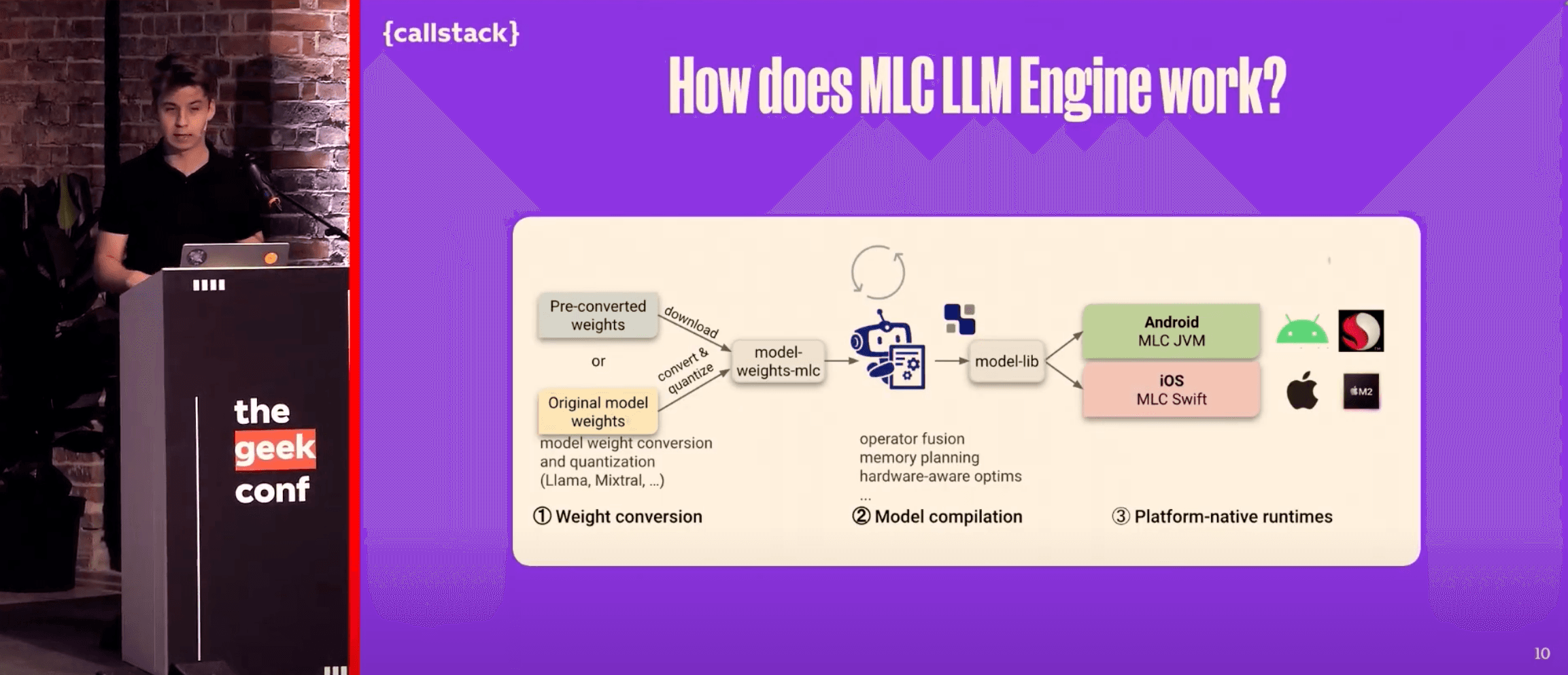
Let’s take a closer look at how this works under the hood. The React Native AI module has native code for both Android and iOS. On Android, I write a wrapper that calls the binaries produced by the MLC engine, and on iOS, I do something similar with static libraries that are linked during build time. I then export this functionality to JavaScript, where it integrates seamlessly with the Vercel AI SDK.
Overcoming Challenges: Polyfills and More
Of course, there were some challenges along the way. Not everything worked perfectly right out of the box. For instance, I had to add polyfills for streaming and other features. But the good news is, things are getting better! Hermes, the JavaScript engine for React Native, is actively improving its support for features like TextEncoder, and the ecosystem is evolving rapidly.
The True Power of React Native
What’s the takeaway here? The true power of React Native lies in its flexibility. We can play with low-level stuff, integrate complex AI models, and still maintain a smooth, intuitive JavaScript API. This is what makes React Native such a powerful tool—it allows us to leverage the best of both worlds.
What’s Next for This Project?
This is just the first iteration of the React Native AI project, and there’s still a lot to do. The API is still in its early stages, and I’m planning to sit down with Oscar (who spoke earlier) to compile it for Vision OS. Imagine running these AI models on a device like Vision Pro, which has an M2 chip—it’s going to be incredible. I’m also looking forward to seeing how Apple integrates AI models directly into the OS in the future.
I’ve just open-sourced this project, so if you’re curious to see how it all works in detail, scan the QR code or head to my GitHub and search for the React Native AI repository. It’s all there, and I’d love for you to check it out, contribute, or just follow along as we continue to build.
Wrapping Up and What’s Next
Thank you for having me here today! It’s been a pleasure to share this with all of you. Callstack also organizes a conference next month in Wrocław, Poland. If you’re interested, here’s a promo code—just scan it, and I hope to see you there.
Integrating AI directly into React Native apps empowers mobile devices to run advanced models offline, unlocking powerful, real-time capabilities without cloud dependence. This approach transforms mobile app performance, offering seamless AI functionality anytime, anywhere.
That’s all from me for now, but keep exploring the true power of React Native and AI. The possibilities are endless!







