

Ever wished you could just talk to your phone and have it create something entirely new, like a recipe, or even an image? That's exactly the kind of magic I wanted to bring to life, and I'm super excited to share my journey building an AI-powered app that does just that!
This is not a theoretical dive into AI; it's a look at how I brought these powerful technologies together using React Native on the frontend, and how I leveraged Google's Gemini for intelligent responses and PollinationAI for stunning image generation. It's a blend of voice interaction, creative AI, and a little bit of code wizardry that I had a blast putting together.
The Core Challenge: Making AI Talk and Create
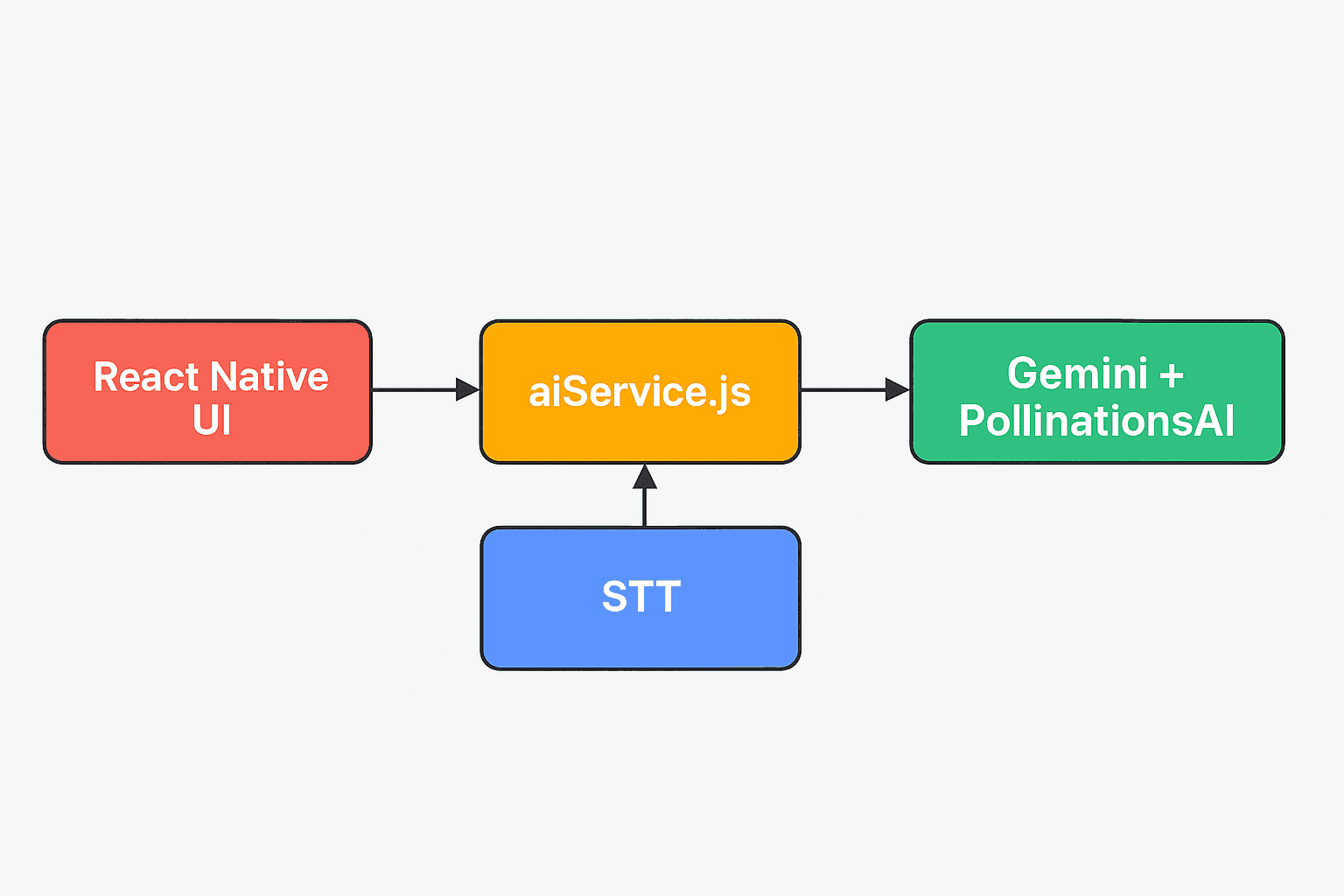
Building this app presented some really interesting puzzles, but solving them was half the fun! The main goal was to connect three distinct layers seamlessly:
- Your Voice to Text: Capturing what you say and turning it into text that my app (and the AI) could understand.
- AI Intelligence (Gemini): Sending that text to a powerful AI model to get an intelligent, tailored response (or a recipe idea!).
- AI Creativity (PollinationAI): Taking text descriptions and generating unique, relevant images.
Speaking the Response: Having the app revert the AI's answer back to you.
To help visualize the flow better, here's a simple architecture diagram :
The Brain of the Operation: Integrating Gemini
At the heart of my app's intelligence is Google's Gemini API. This is where the magic of understanding your queries and generating creative text responses happens. Instead of a traditional backend server, I directly integrated Gemini's capabilities into my React Native app, making it incredibly fast and responsive.
I structured my AI interactions through a dedicated service file, aiService.js. This keeps my AI logic clean and separate from the UI components. It's essentially the bridge between my app and the powerful Gemini model.
Here’s a glimpse of how aiService.js handles the communication with Gemini:
/ Simplified aiService.js for blog post
import { GEMINI_API_KEY } from "@/config/apiConfig"; // Your API key
import { GoogleGenerativeAI } from "@google/generative-ai";


// Initialize Gemini AI Client
const genAI = new GoogleGenerativeAI(GEMINI_API_KEY);


// Function to call Gemini and get a text response
const getGeminiResponse = async (prompt) => {
 const model = genAI.getGenerativeModel({ model: 'gemini-1.5-flash' });
 const result = await model.generateContent(prompt);
 const response = await result.response;
 return response.text();
};


// Function to generate an image using PollinationAI
const generateImageWithPollinationAI = (description, cuisine) => {
 let prompt = `professional food photography of ${description}`;
 if (cuisine) {
   prompt += `, ${cuisine} cuisine style`;
 }
 prompt += `, appetizing, high quality, restaurant style, beautiful plating, warm lighting`;
  // Direct call to Pollinations.ai free API (no API key needed for this public endpoint)
 return `https://image.pollinations.ai/prompt/${encodeURIComponent(prompt)}?width=400&height=400&seed=${Date.now()}`;
};


// Main function to generate a recipe with AI and an image
export const generateRecipeWithAI = async (ingredients, cuisineType) => {
 // Craft a detailed prompt for Gemini to generate a JSON recipe
const geminiPrompt = `Create a JSON recipe for: ${ingredients}.
  Preferences: ${cuisineType || 'any'} cuisine.
  JSON format only:
 {
   "recipeName": "string",
   "description": "brief description",
   "cuisine": "string",
   "ingredients": [{"name": "ingredient", "quantity": "string"}],
   "instructions": [{"step": 1, "description": "string"}]
 }`;


 console.log('Sending request to Gemini...');
 const geminiTextResponse = await getGeminiResponse(geminiPrompt);


 // Clean and parse the JSON response from Gemini
 const cleanText = geminiTextResponse.replace(/```json\n?/g, '').replace(/```\n?/g, '').trim();
 const recipeData = JSON.parse(cleanText);


 // Generate an image based on the recipe name and cuisine using PollinationAI
 console.log('Generating image with PollinationAI...');
 recipeData.imageUrl = generateImageWithPollinationAI(recipeData.recipeName, recipeData.cuisine);


 console.log('Recipe generated successfully with image!');
 return { success: true, data: recipeData };
};


// You can add other functions like generateMultipleRecipesWithAI similarly if needed
As you can see, the getGeminiResponse function takes the user's spoken input (converted to text), crafts a prompt to guide Gemini's behavior (making it a "creative assistant"), and then sends it off. This design allows for flexible interaction – whether you are asking for a recipe, general advice, or anything else, Gemini handles it!
Bringing Ideas to Life: Image Generation with PollinationAI
Beyond text, I wanted my app to visualize the AI's output. This is where PollinationAI stepped in. It's an incredible platform for generating images from text descriptions. After Gemini gives me a recipe idea, I can use a part of that description to ask PollinationAI to create a corresponding image, truly bringing the AI's creativity to life on the screen.
The integration was also handled within a similar service structure, ensuring clean separation of concerns:
export const generateRecipeImage = async (recipeName, cuisine = '') => {
 try {
   console.log(`🖼️ Generating image for recipe: ${recipeName}`);

   // Create a detailed prompt for better food images
   let prompt = `professional food photography of ${recipeName}`;
   if (cuisine) {
     prompt += `, ${cuisine} cuisine style`;
   }
   prompt += `, appetizing, high quality, restaurant style, beautiful plating, warm lighting`;

   // Use Pollinations.ai free API - no API key required
   const imageUrl = `https://image.pollinations.ai/prompt/${encodeURIComponent(prompt)}?width=400&height=400&seed=${Date.now()}`;

   console.log(`✅ Generated image URL: ${imageUrl}`);
   return {
     success: true,
     imageUrl: imageUrl,
     prompt: prompt
   };
 } catch (error) {
   console.error('❌ Error generating recipe image:', error);
   return {
     success: false,
     error: error.message,
     // Fallback to a food placeholder image
     imageUrl: 'https://via.placeholder.com/400x400/ED5565/FFFFFF?text=🍽️'
   };
}
};
The aiService.js is used for the same PollinationAI here the snippet is conceptual, as PollinationAI's API details might vary, but it illustrates the idea.
This allows my app not just to tell you a recipe, but to show you what it might look like, adding a whole new dimension to the user experience!
The User Interface: React Native and Voice Integration
On the frontend, React Native was my go-to choice. It allowed me to build a beautiful, fluid interface that works seamlessly on both iOS and Android. For voice input, React Native's bridge to native modules enabled me to tap into the device's Speech-to-Text (STT) capabilities.
Here's a simplified look at how the voice interaction might be triggered in a React Native component:
// Simplified VoiceToTextService.js for blog post
import Voice from '@react-native-voice/voice';


export class VoiceToTextService {
 constructor() {
   this.recognizedText = '';
   this.isListening = false; // Track listening state


   // Key event handlers for speech recognition
   Voice.onSpeechStart = () => {
     console.log('Voice recognition started!');
     this.isListening = true;
     this.recognizedText = ''; // Clear previous text on start
   };


   Voice.onSpeechResults = (event) => {
     if (event.value && event.value.length > 0) {
       this.recognizedText = event.value[0];
       console.log('Final speech result:', this.recognizedText);
     }
   };


   Voice.onSpeechEnd = () => {
     console.log('Voice recognition ended.');
     this.isListening = false;
   };


   Voice.onSpeechError = (event) => {
     console.error('Voice recognition error:', event.error);
     this.isListening = false;
   };
 }


 async startListening() {
   try {
     if (this.isListening) {
       console.log('Already listening.');
       return;
     }
     await Voice.start('en-US'); // Start listening, e.g., in US English
   } catch (error) {
     console.error('Error starting voice recognition:', error);
     throw error;
   }
 }


 async stopListening() {
   try {
     if (!this.isListening) {
       console.log('Not currently listening.');
       return;
     }
     await Voice.stop();
   } catch (error) {
     console.error('Error stopping voice recognition:', error);
     throw error;
   }
 }


 getRecognizedText() {
   return this.recognizedText;
 }


 destroy() {
   Voice.destroy().then(Voice.removeAllListeners);
 }
}


// Export a singleton instance
export const voiceToTextService = new VoiceToTextService();
This snippet shows the core flow: the user taps a button, Voice.start() begins listening, onSpeechResults captures the transcript, and onSpeechEnd triggers the call to Gemini and then PollinationAI, with the final AI response.
What I Learned and What You Can Build
Building this app was an incredible learning experience. It showcased how seemingly complex AI interactions can be broken down and built with readily available tools like Gemini, PollinationAI, and the versatile React Native framework.
This isn't about generating recipes; it's about the power of conversational AI and generative models to:
- Create dynamic content: From text to images, AI can now produce unique outputs on demand.
- Enhance accessibility: Voice interfaces make apps more intuitive and accessible for everyone.
- Boost creativity: AI can act as a co-creator, sparking ideas and bringing them to life visually.
The journey of blending speech, AI intelligence, and creative generation into a cohesive user experience has truly begun. I hope this might be useful for you, and most importantly, you will have the same fun I had building it.







