


There is a continuous pursuit of scalability, maintainability, and agility, and traditional monolithic architectures often hit roadblocks in large-scale applications. The constraints of monolithic architecture, characterized by tightly coupled components and a single, monolithic codebase, pose significant challenges as applications grow in complexity and user base.
Micro frontend architecture, inspired by the success of microservices on the backend, presents a revolutionary approach to frontend development. By breaking down monolithic frontend applications into smaller, self-contained units, known as micro frontends, this architectural style offers a pathway to overcome the constraints of monolithic architecture. Each micro frontend operates independently, focusing on a specific feature or functionality, yet seamlessly integrates with other micro frontends to form a cohesive user experience. This modular and decentralized approach not only enhances scalability and maintainability but also fosters a culture of innovation, empowering development teams to iterate rapidly and deliver value to users with greater efficiency.
We utilized the Build Time Integration Pattern to Implement the Micro-Frontend Architecture .
The goal is to build a low-code/no-code tool with a server-driven UI. To achieve a completely configurable UI, we have divided the features into small micro frontends called patterns. The patterns were broadly categorized into -
- Simple UI patterns.
- Complex patterns, which were itself like a micro App.
The patterns were completely independent of each other, and hence there was no tight coupling. Each pattern was developed separately that required a configuration json to perform the initial render.
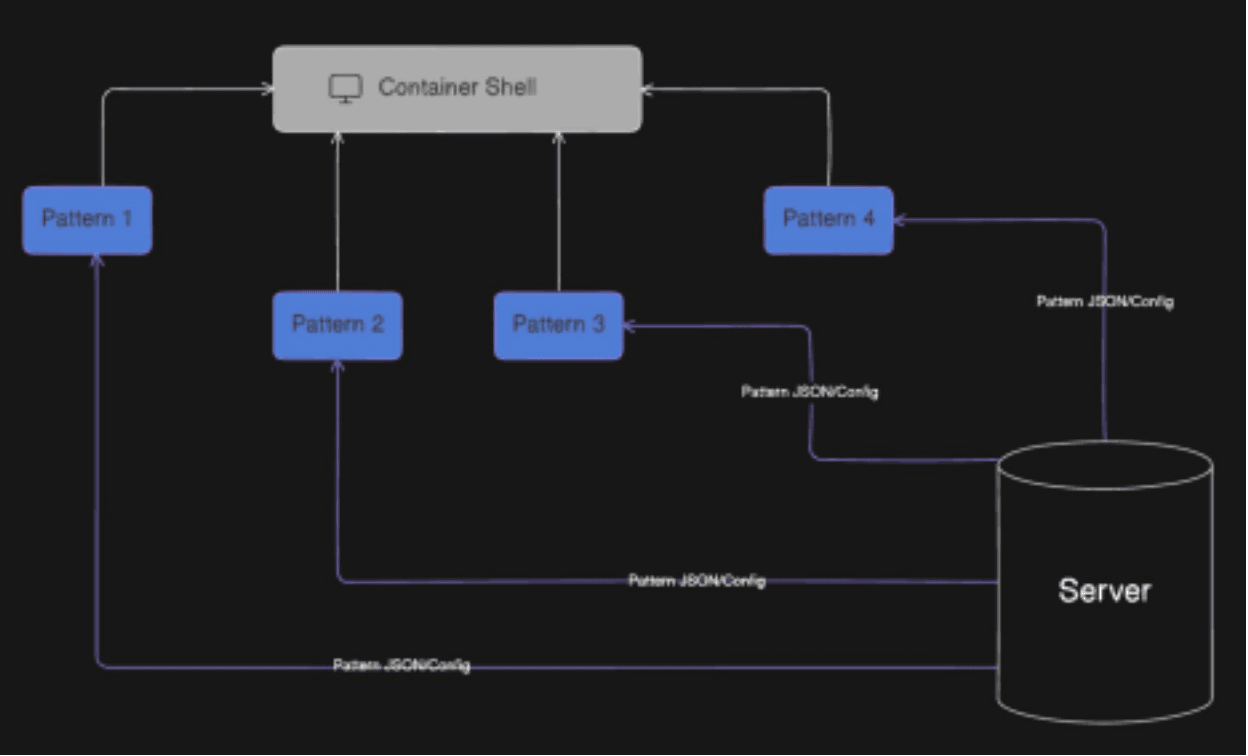
We divided our codebase into four separate repositories, as shown below.
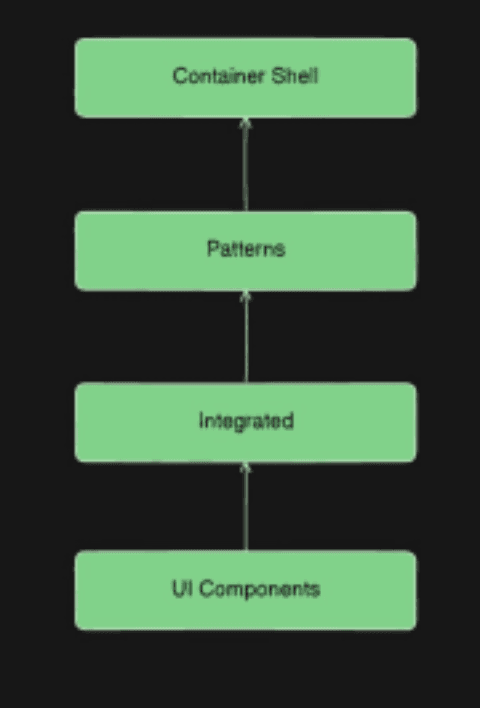
UI Components: This contains all the UI atoms and molecule elements needed to construct the patterns. Each UI element is given a specific name used during JSON formation. It contains a UI Render Engine responsible for setting up the UI layout as per the JSON Configuration coming from the server. The patterns further import this to configure their UI using the atomic UI elements.
Integrated: This contains all the business logic-related code necessary to connect to the server and make the API calls to fetch the data. It also contains all the project dependencies. It is an integrated package, like a single dependency for the Patterns.
Patterns: This contains all the Patterns/Micro-Frontends required for the project. It imports the UI render engine to form the necessary UI.
Container Shell: This is the main container shell that renders the patterns. It contains an App Spec Render Engine responsible for setting up the layout and pages with the App Layout Specification from the server.
We used NX mono-repo setup to improve the developer experience to manage and handle all four repositories independently.
Building the UI Rendering Engine
Here’s a high-level overview of how we built the UI rendering engine:
1. Define the JSON Schema:
The first step was to design a comprehensive JSON schema describing various UI components such as forms, buttons, tables, and charts. This schema includes properties for each component, like type, label, value, and actions.
[
 {
 "grid": {
 "maxRow": "2",
 "content": [
 {
 "label": {
 "title": "Senior citizen",
 "status": "RED",
 "type": "SIMPLE"
 }
 },
 {
 "label": {
 "title": "Call Forward",
 "status": "RED",
 "type": "SIMPLE"
 }
 }
 ]
 }
 }
]
2. Build the Rendering Engine:
We created a rendering engine that parses the JSON configuration and dynamically generates the corresponding UI components.
export function uiGenerator(jsonSchema, additionalProps = und  if (!jsonSchema || (Array.isArray(jsonSchema) && jsonSchema  //return null if empty json
 return null;
 if (!Array.isArray(jsonSchema)) {
 const {type, props} = getTypeAndProps(jsonSchema);  return ComponentGenerator(type, props, additionalProps);  }
 // loop through the array and return individual component i  return jsonSchema.map((componentJson) => {
 if (!componentJson) return null;
 const {type, props} = getTypeAndProps(componentJson);  return ComponentGenerator(type, props, additionalProps);  });
}
//generates the component
function ComponentGenerator(componentType, props, additionalP  const Component = componentMap[componentType];  return React.createElement(Component, {
 ...props,
 ...additionalProps,
 key: getNewId(),
 });
}
function getTypeAndProps(obj) {
 const type = Object.keys(obj)[0];
 const props = Object.values(obj)[0];

 return {type, props};
}
3. Integrate with the Backend:
The backend service is responsible for generating and serving the JSON configurations using Mustache templates. Mustache is a logic-less template engine that allows you to create templates with placeholders. These placeholders are dynamically replaced with data at runtime. I used Mustache templates on the server to form the JSON configurations dynamically. This service can dynamically create the JSON based on user roles, data, or specific business logic.
4. Implement Error Handling and Validation:
Robust error handling and validation mechanisms were added to ensure the JSON configurations were correct and the UI components were rendered without issues. This includes validating the JSON schema and providing fallback UI components in case of errors. To ease the process, we used Zod with Typescript to handle runtime type validations.
The UI Render Engine helped form the patterns. Each Pattern was configurable, with the data shown based on the User Access Role or other specific business logic.
Conclusion
We transformed our monolithic frontend into a scalable, maintainable, and modular system by adopting a micro frontend architecture and build time integration. Dividing the codebase into independent repositories for UI components, business logic, patterns, and the container shell allowed for focused development and seamless integration. This approach enabled us to create a fully configurable, server-driven UI that adapts to specific user needs, ensuring flexibility and efficiency in our application.







