

Introduction
Whenever you hear the words workflow and automation, what comes to mind? All that jazz about work, flow, and working in a flow, right? That's spot on!
The trick here is to combine these words and use them to speed up your work and make things happen automatically.
In this article, we discuss
- What workflow automation offers
- Examples of automation infrastructures in real-world settings
- How to establish automated workflows
- GeekyAnts’s exploits in this field.
- Future of automation
Workflow Automation: What It Brings to the Fore
Most IT leaders attribute 10-50% of their time saved to automation. Time is money, and automating your workflow not just helps with saving resources but also eliminates time-consuming and tedious tasks. See what else automation can do for you:
- By automating workflows, companies reduce the number of repetitive tasks and manual labor. In turn, processes become more efficient, and workers spend more time doing value-added tasks.
- Automating a process can increase accountability for all parties involved.
- Within an automated workflow, each stakeholder is aware of their responsibilities.
- When repetitive, labor-intensive tasks are automated, worker satisfaction soars.
- The information transfer between tasks can be done without interruption using an automated process.
Workflow Automation: Applications in the Organizational Setting
Every workflow has tasks or activities that can be automated, but the level of automation for each workflow varies. The following are examples of how workflow automation software reduces the need for manual handling while exponentially speeding up workflow.
- The creation and distribution of invitations and calendar events.
- When work is late or approaching its deadline, alerts are triggered.
- When approval or review is required, notifications are sent automatically.
- Work items are assigned or routed to the concerned individual accordingly.
Implementing Automation in Your Organization
After considering the significance and application of automation software, it is only fair to consider the steps involved in implementing a highly functional automation infrastructure in your workplace.
- Step 1: Determine which departments or workflows would benefit from automation.
- Step 2: Break the mechanisms down into steps to map them easily.
- Step 3: Stay clear about your business objectives.
- Step 4: Choose and install workflow automation software selectively.
- Step 5: Educate your employees on the new changes and standards.
- Step 6: Prioritize key performance indicator metrics (KPIs) for measuring implementation success.
- Step 7: Allow for continuous improvement by collecting employee feedback in conjunction with the performance indicators.
Problems With Adopting an Automation System
Even though there’s an influx of organizations taking up automation software to regulate their redundant processes, it comes with its own set of challenges.
Let’s take a look at some of these challenges.
- Governing and authority issues over the automation software
Different, isolated teams are automating separate business processes. A company's IT or technical team is tasked with automating processes by deploying bots using the software they invested in. As a result, there are significant dependencies and bottlenecks, limiting agility and effectiveness.
- Deciding on what to automate
The common misconception about the adoption of automation software was that it would shoot up the ROI by reducing the headcount in an organization. In reality, the return on investment has come from making business processes more reliable, faster, and of higher quality, freeing up talent that was previously performing repetitive, mechanical tasks to focus on more critical, higher-value deliverables directly related to business objectives.
- Scalabilty of the automation wave organization-wide
Process automation can be taxing, but implementing it in all aspects of work processes can be even more difficult. According to reports, the main impediment to this initiative is a reported lack of an enterprise-wide automation strategy as well as a shortage of both leadership and talent. Scalability will continue to be a major challenge for all organizations as they usher in this nearly completely automated ecosystem.
Automation and Geekyants
Automation has been a recurring theme at GeekyAnts, and if our portfolio is any indication, we've successfully experimented with a wide range of automation software.
Some examples are mentioned below:-
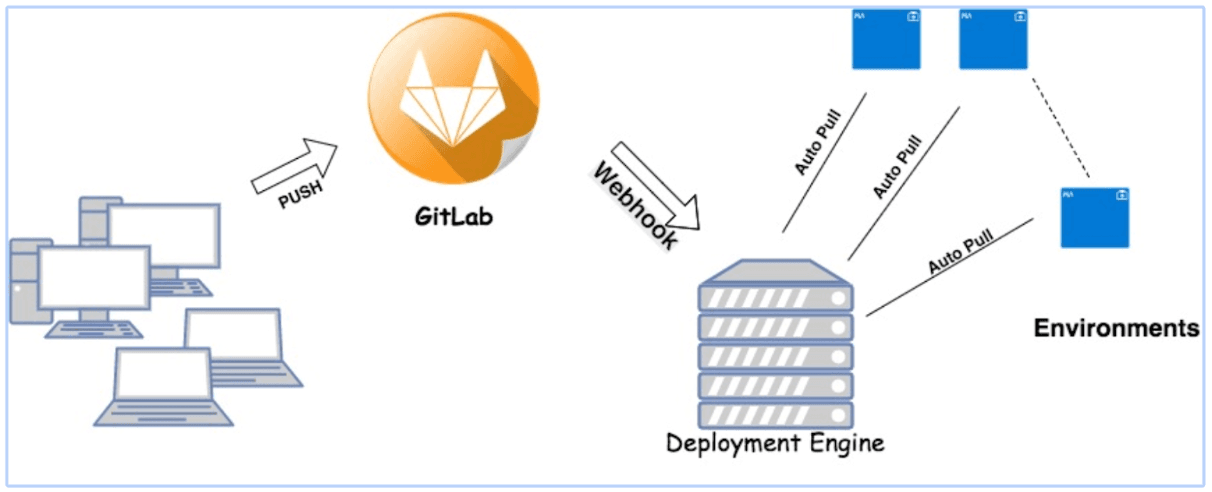
- Automation in CI/CD Ecosystems
The importance of customized engines is very clear at GeekyAnts. By offering improved security, better control over Branch / Environment Level Deployment, and simple configuration choices for multi-server scenarios, our customized deployment engine aims to automate integration.
- Automation Everywhere
Consider our white-label application work. Our approach speeds up the entire process of adding data to a database and showing it on the appropriate dashboards. Content creators can create custom dashboards without having to go through the tedious process of editing the supporting JSON file.
Future of Automation
The fact that more automation-related startups are working to provide standardized network automation solutions is highly encouraging for the future of automated systems.
Additionally, approval processes and data syncing across applications with integrated API solutions improve the automation infrastructures' capabilities and are positive signs for businesses operating in this industry.
Visit this page to learn how GeekyAnts can assist you in creating your own automation solution.







